ClaudeClaw Field Guide
A pixel-correct, hands-on manual for the personal AI OS we built on top of ClaudeClaw — including how it could scale to a team, how the KAWASIST internals lay out, and 31 copy-ready prompts you can drop into any session.
Part 0TL;DR
ClaudeClaw is not Claude. It's a wrapper around the Claude Code CLI that adds (1) a Telegram bot, (2) a web dashboard, (3) persistent auto-consolidated memory, (4) scheduling, (5) optional multi-agent capability. Every turn spawns a fresh Claude subprocess with KAWASIST as context. It's the conductor, not the orchestra.
Use it when you're on your phone, you want something on a schedule, you want async background work, or you want a kill-switch above a running agent. Use Claude Code directly when you're at the laptop doing deep work with diffs and plan mode.
Part 1Mental model
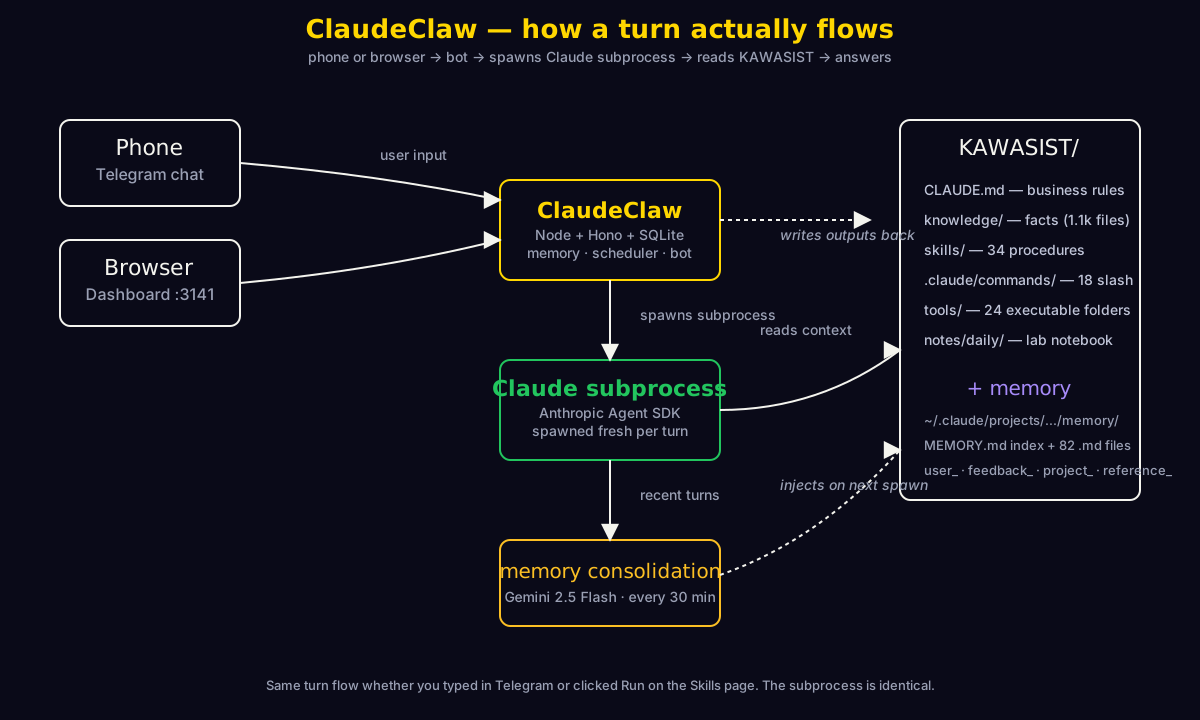
One turn in plain English: you type or speak in Telegram → ClaudeClaw daemon catches the update → spawns a fresh claude subprocess via the Anthropic Agent SDK → that subprocess reads KAWASIST/CLAUDE.md, pulls the most relevant memories by embedding similarity, finds the right skill or tool, executes, returns text → ClaudeClaw logs the turn to SQLite, posts the reply back to Telegram, and a 30-min consolidator re-summarizes recent turns into the long-term memory.
Claude Code direct vs. ClaudeClaw
| Use Claude Code directly when… | Use ClaudeClaw when… |
|---|---|
| Sitting at the laptop in deep work | You're on your phone |
| Editing files, reviewing code, planning a refactor | You want something done on a schedule |
| You want plan-mode + diffs + approval gates | You want async background work ("when free, scan WA") |
| You want a single focused session | You want monitoring across multiple workstreams |
| You can interactively type / paste / scroll | Voice-in → text-out is your input shape |
The agent concept
The "main agent" is one Telegram bot (@Kawader_Claw_Bot in our case) wired to KAWASIST/CLAUDE.md, the skills folder, the memory store, and the configured MCP servers (Notion, Gmail, WhatsApp, Drive, Odoo). Today there's one agent. Section 5 walks through when adding more makes sense and what the scoping model looks like.
Chat vs Mission vs Scheduled vs Skills — four ways to invoke the bot
| Surface | How it works | When to use |
|---|---|---|
| Chat (Telegram or dashboard) | Real-time, you wait for the reply | Quick questions, drafting, decisions, voice notes |
| Mission Control | Async — enqueue, bot picks it up, posts result when done | "Tomorrow morning, audit overdue Notion tasks" — fire and forget |
| Scheduled | Cron-style recurring | "Every weekday at 7am, run /home" |
| Skills | One-click run of a /command from .claude/commands/ | Fast trigger of named procedures (/home, /brief, /site-iter…) |
Memory — what's different from chat history
- Every turn is logged to
conversation_login SQLite. - Every 30 min, Gemini 2.5 Flash scans recent turns, writes a one-paragraph insight with key entities + topics, embeds it, and stores it in
memories. - On every new turn, the bot fetches the most relevant memories by cosine similarity to your prompt and injects them into Claude's context.
So next week when you ask "what was that grant deadline for IBNS S2 again?", the relevant memory surfaces — even if that conversation was 200 turns ago.
Part 2Page-by-page tour
One figure per route. All annotations are now pixel-correct against the captured screenshots. Hover any number for the matching step; click any number to scroll to that step in the list below. Click the figure to zoom.
Mission Control — the kanban
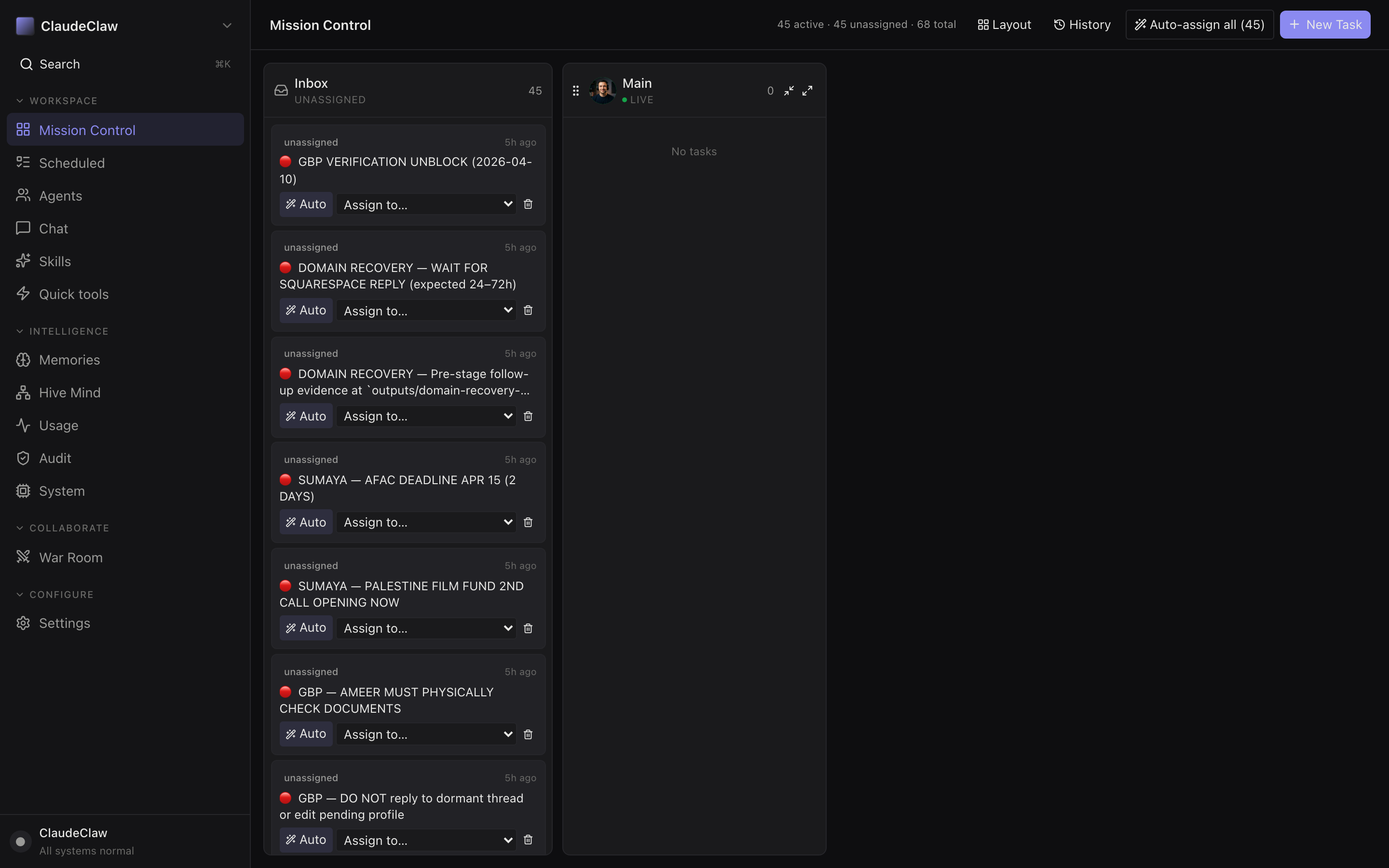
- Mission Control highlighted in the sidebar — you're on the kanban page.
- Counter strip — "45 active · 45 unassigned · 68 total". Fastest way to spot a backlog.
- Auto-assign all (45) — mass-assigns every unassigned task to Main. Each becomes a real Claude turn — don't click this on seeded tasks.
- + New Task button — manual enqueue. Title + optional body; lands in Inbox unless you assign on creation.
- Inbox column (unassigned) — tasks waiting for assignment. The 45 seeded here are STATUS.md focus-line snapshots, context only, not work for the bot to do.
- Main agent column (live + completed) — tasks claimed by the worker. Completed tasks vanish after 30 min — they're not deleted, just hidden; visit History.
System — health + emergency stop
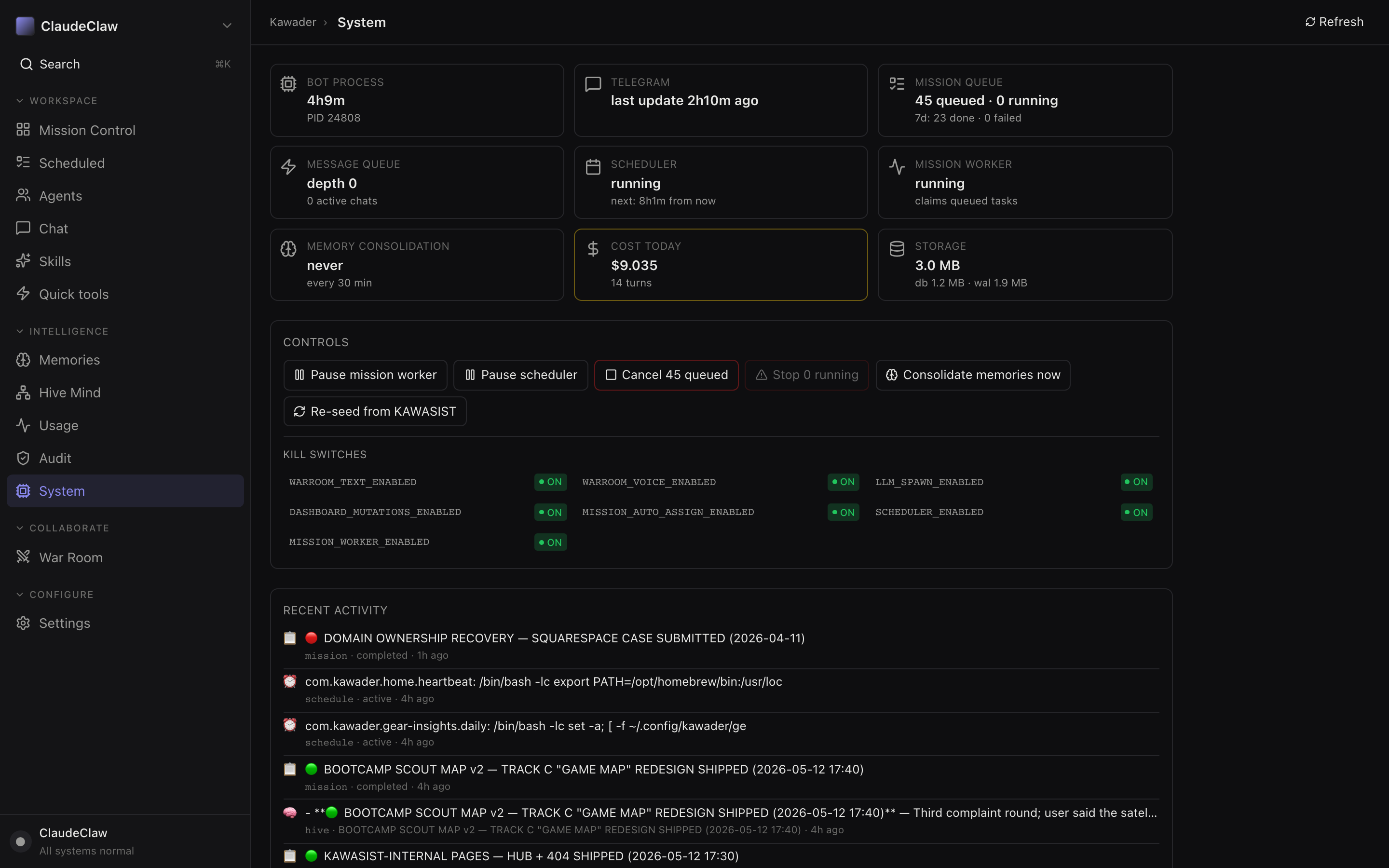
- System highlighted in the sidebar.
- BOT PROCESS tile — uptime + PID. If Telegram last-tick is more than ~3 min, the bot stopped receiving updates.
- SCHEDULER tile — running state + next-run time. Green badge = enabled and scheduled to fire.
- COST TODAY tile (gold-bordered) — live USD spend + turn count. Watch this when scheduled tasks ramp up.
- Controls row — Pause mission worker / Pause scheduler / Cancel N queued / Stop N running / Consolidate memories / Re-seed. The Cancel N is your one-click brake.
- Kill switches grid — runtime feature gates. Toggle takes effect in ≤1.5 s (worker re-reads
.envon every tick). - Recent activity feed — last 50 events (missions, scheduled, hive-mind, KB writes) unioned. Where you confirm "did the thing actually fire?"
Skills — one-click slash commands
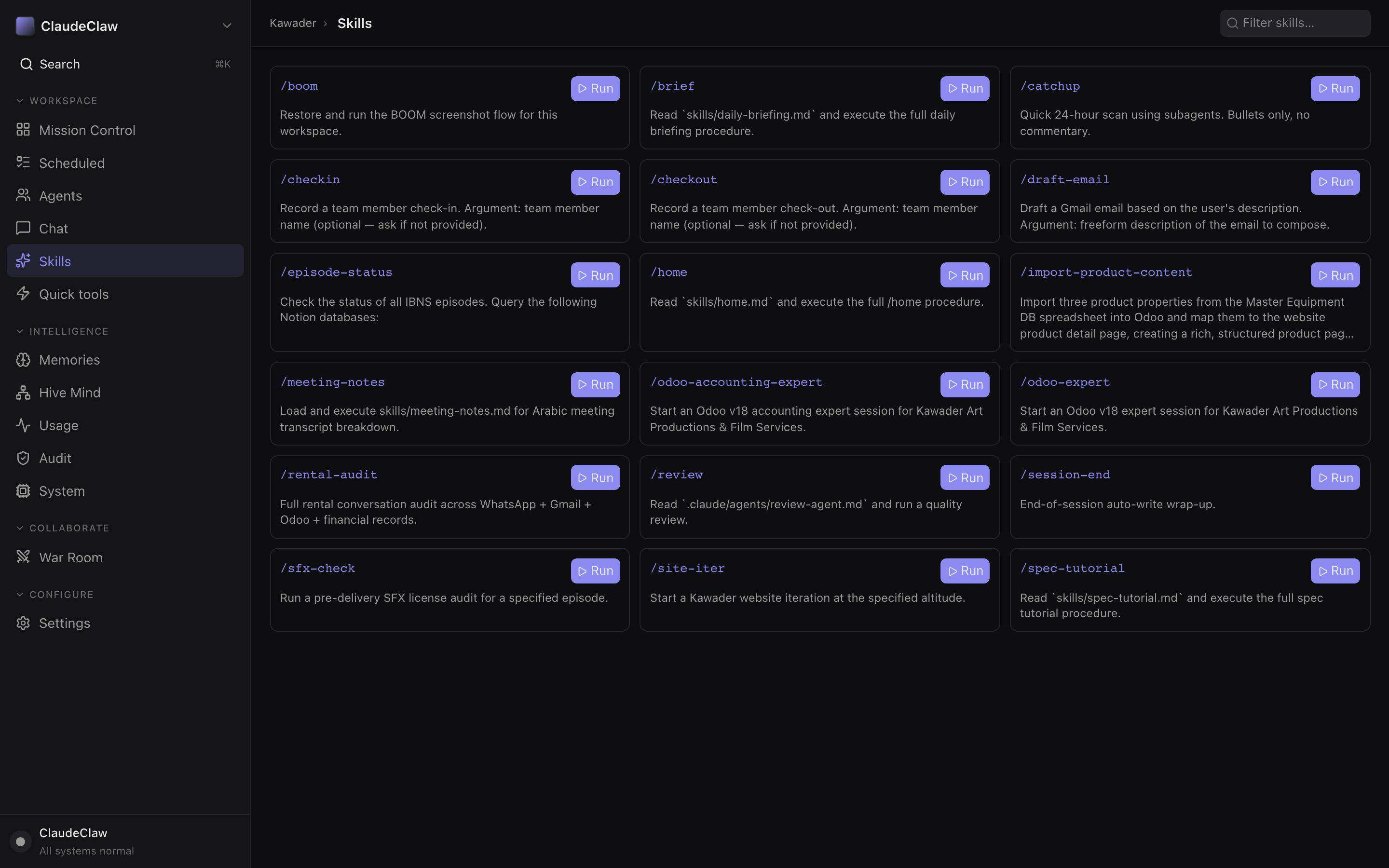
- Skills highlighted in the sidebar.
- Filter skills box — type to filter the 18 cards (matches name + description).
- Skill card — one per
.claude/commands/*.mdfile. Name, description, status./homeruns your daily front-face routine. - Run button — fires the skill against the current chat. ClaudeClaw expands the command body into a prompt and runs it as a real Claude turn.
Quick tools — SaaS launcher + presets + scheduling + file browser
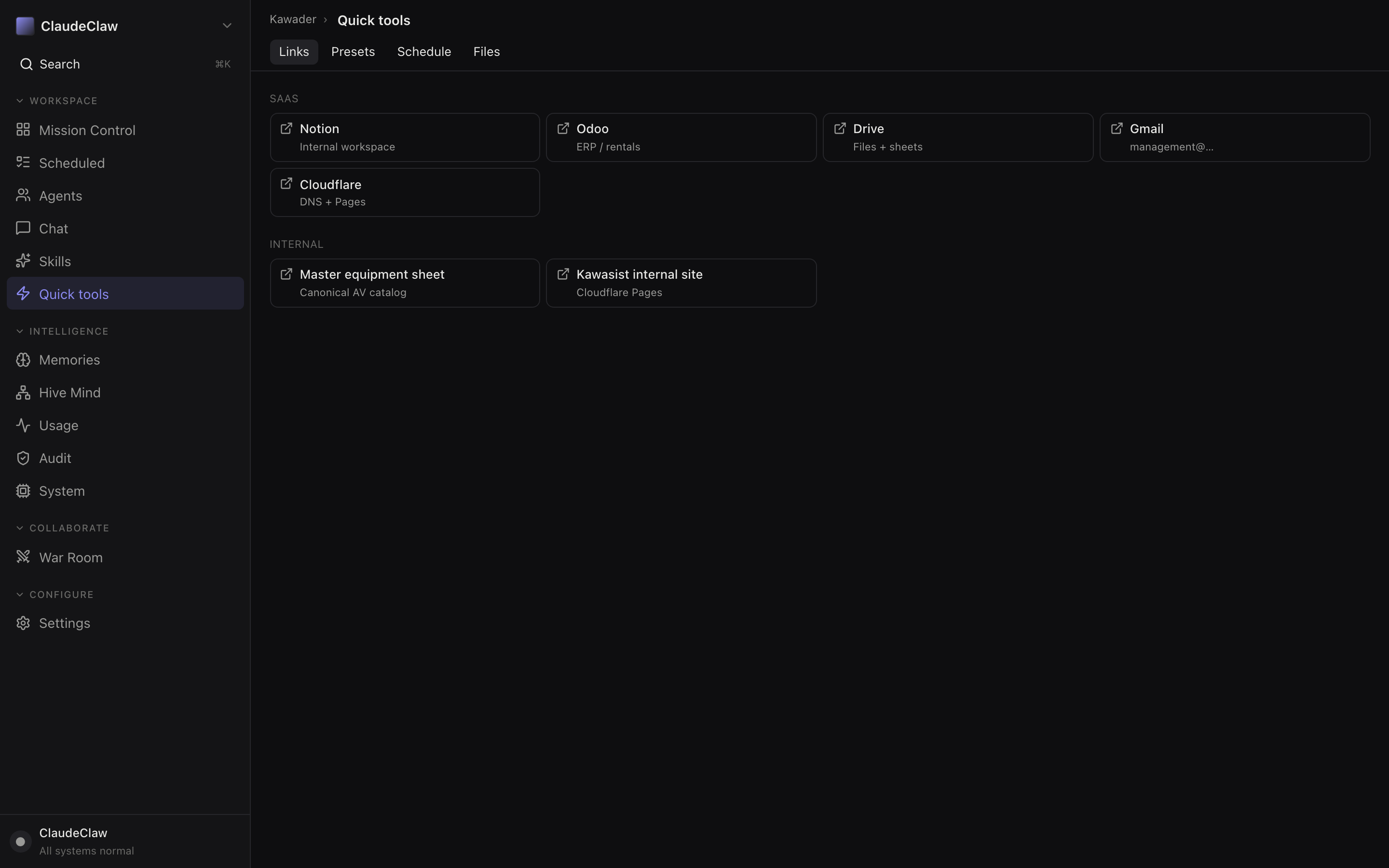
- Quick tools highlighted in the sidebar.
- Links tab — also Presets / Schedule / Files. Presets are canned prompts; Schedule one-offs a future task without cron.
- SAAS cluster — Notion / Odoo / Drive / Gmail / Cloudflare launchers. Opens in a new tab.
- INTERNAL cluster — Master equipment sheet + Kawasist internal Pages site. Bookmarks you'd otherwise type.
Chat — the same chat as Telegram, in the browser
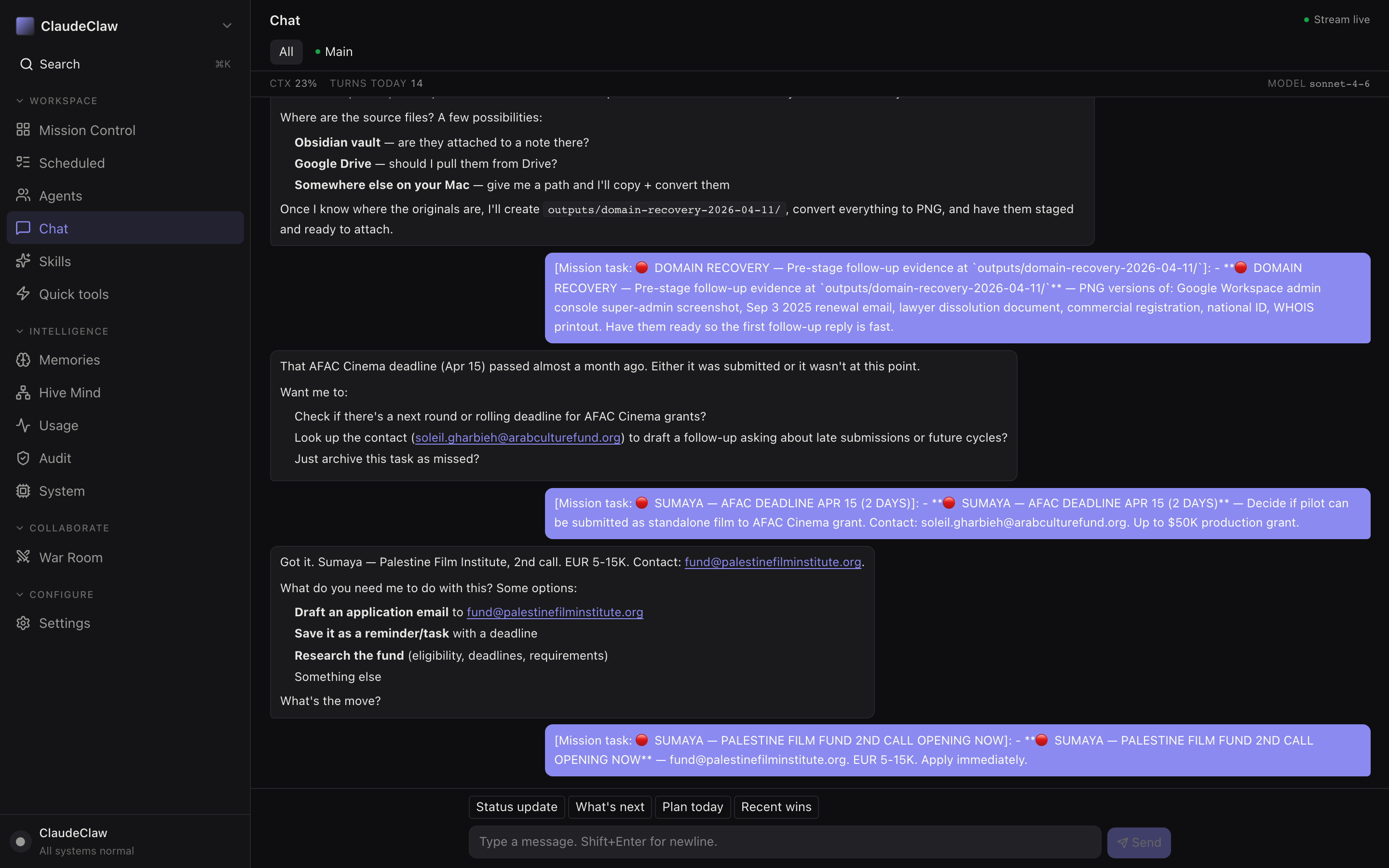
- Chat highlighted in the sidebar.
- Quick chips above the composer — Status update / What's next / Plan today / Recent wins. One-tap prompts that prepend a known intent.
- Message composer — Shift+Enter for newline, Enter to send. Drag-drop a file to attach.
Scheduled — cron jobs in plain English
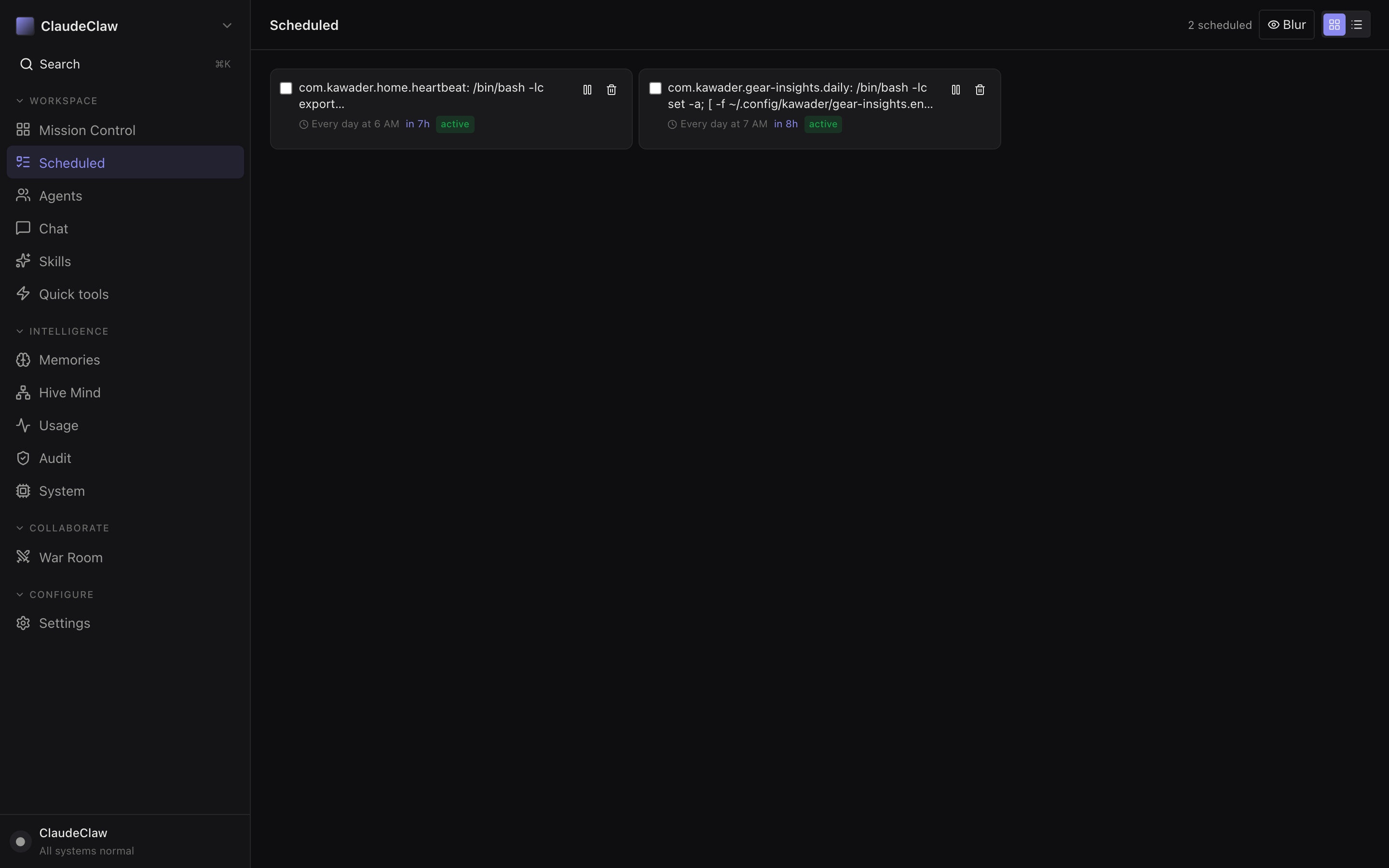
- Scheduled highlighted in the sidebar.
- Header counter — number of active scheduled jobs.
- Scheduled job card — name, command, fire schedule, active state. Click the pause icon to skip firings without deleting.
- Active status badge — green = enabled. The
in Nhnext to it is the next fire time.
Agents — the bot registry
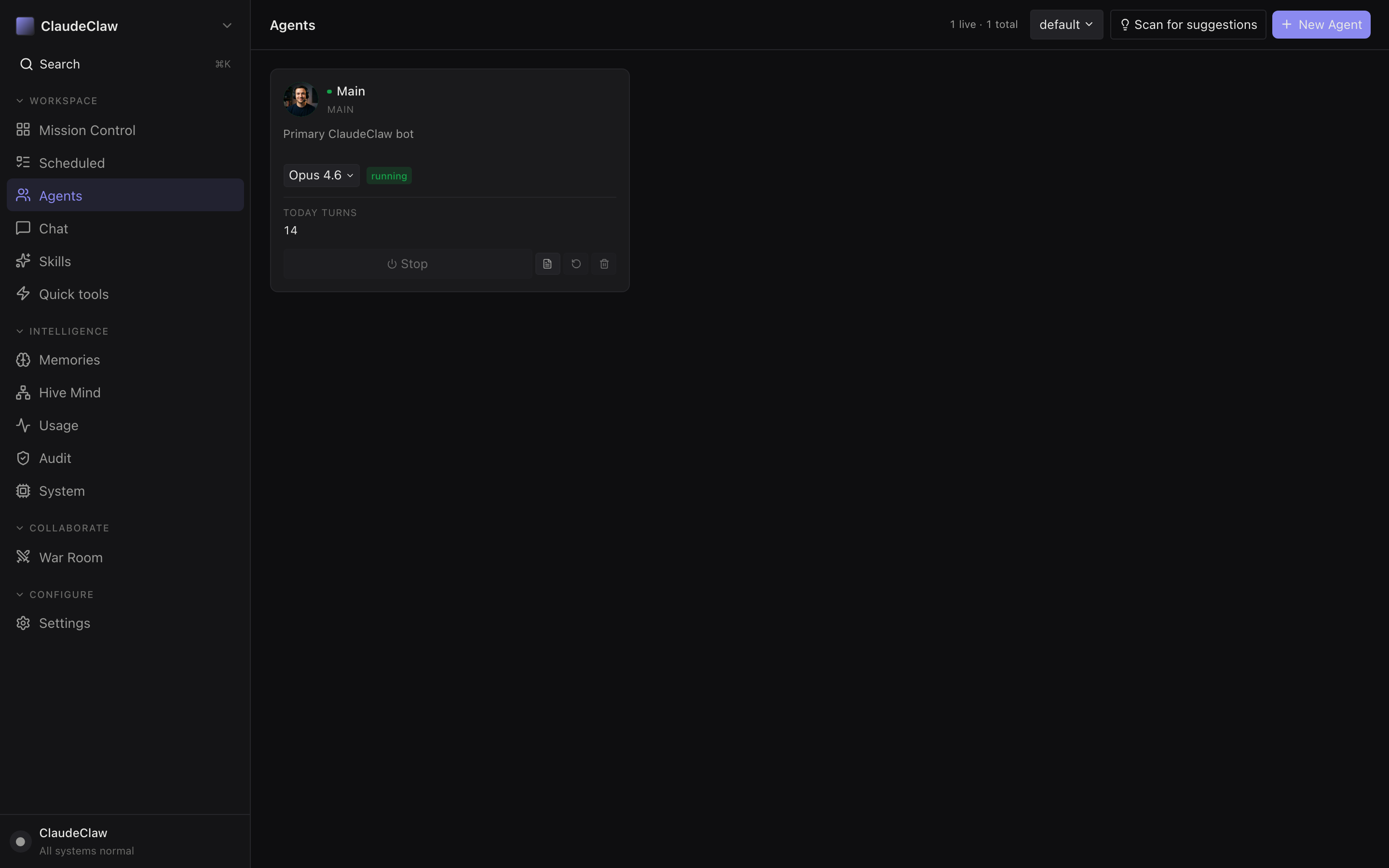
- Agents highlighted in the sidebar.
- + New Agent — register a new bot. Each agent gets its own Telegram bot token, CLAUDE.md, and skill scope (Section 5).
- Main agent card — name, description, default model, status. Click the model dropdown to override per-chat.
- Running badge — green = bot listener is connected to Telegram and accepting messages.
Memories — searchable auto-extracted insights
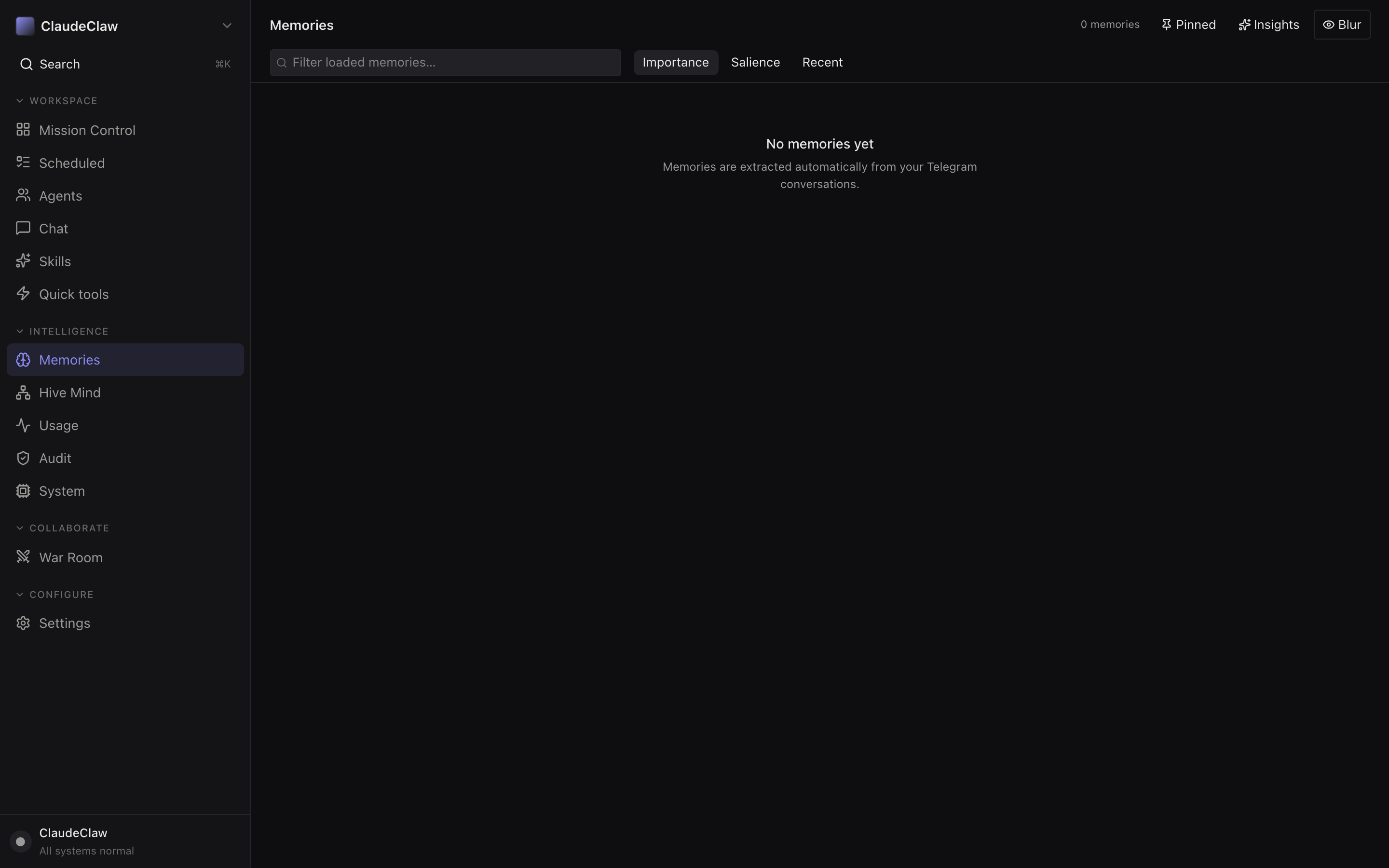
- Memories highlighted in the sidebar.
- Filter loaded memories — natural-language search across the consolidated insights.
- Sort chips — Importance (LLM-rated) / Salience (recency × frequency) / Recent (raw timestamp).
- Empty state — memories are extracted automatically from Telegram conversations. No conversations yet → no memories. Once you chat a bit, this fills in.
Hive Mind — activity timeline as a 3D brain
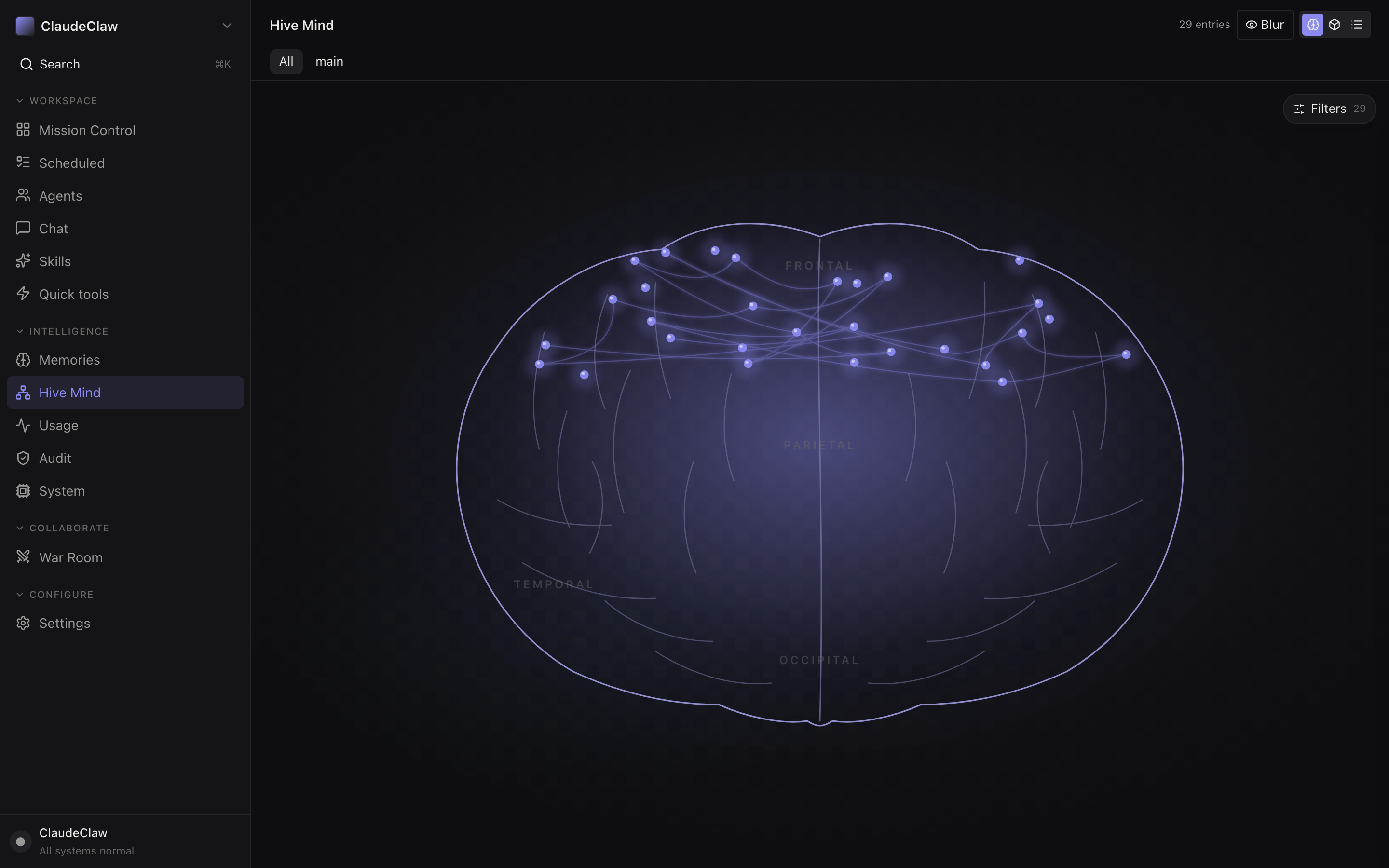
- Hive Mind highlighted in the sidebar.
- Agent-tab chips — All / Main. With multiple agents (Section 5), tabs let you isolate one stream.
- Filters button — narrow the activity stream by action type, agent, or time window.
- 3D brain visualization — each glowing node is a recent hive-mind entry. Lobes are coarse categories. Most useful after overnight runs to see what fired.
Usage — tokens, cost, and connections
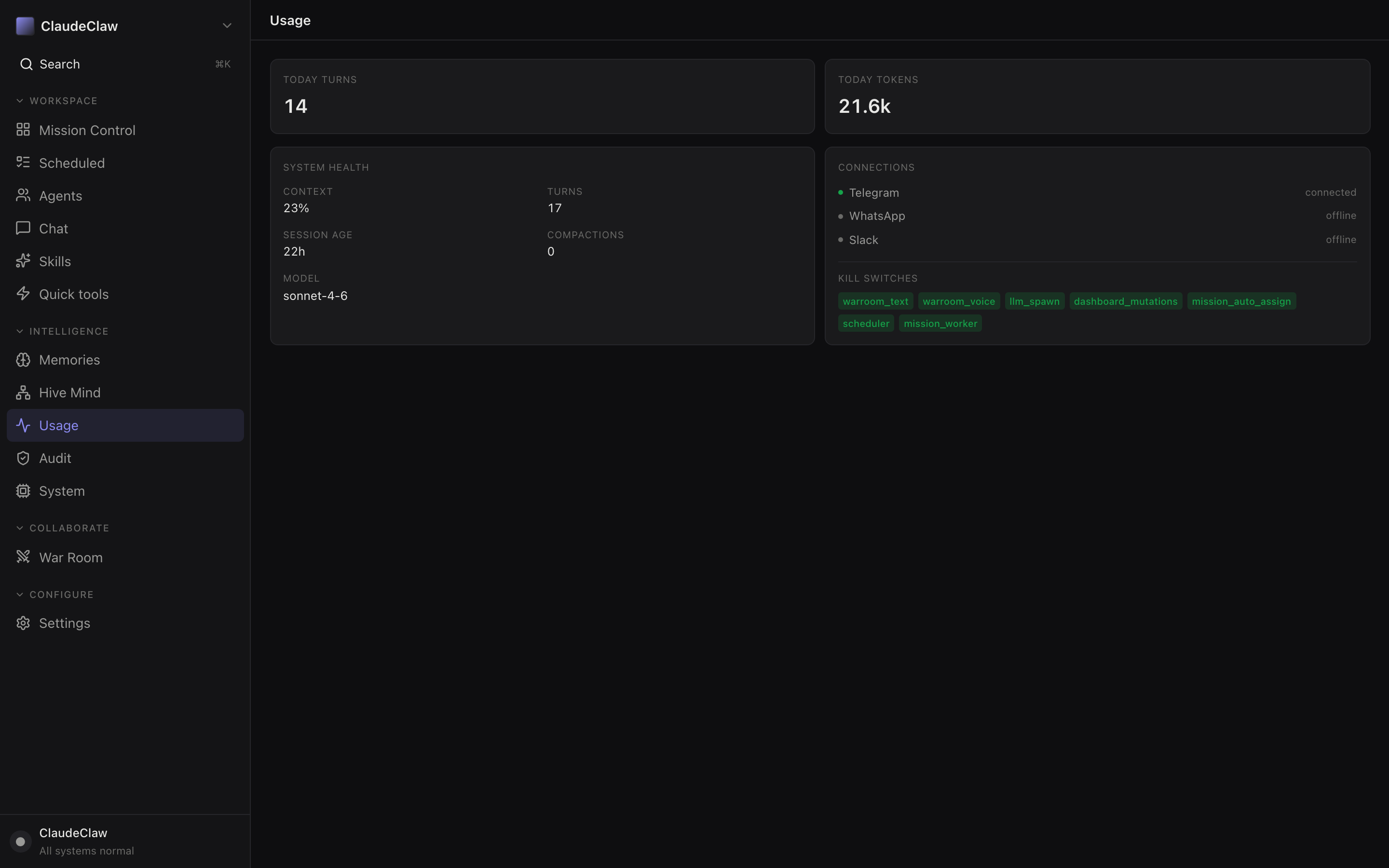
- Usage highlighted in the sidebar.
- Today turns tile — how many spawns happened today. Each is one Claude API call.
- Today tokens tile — total input+output. 21.6k here is a normal day with a few briefs + chats.
- System health panel — context use %, session age, compactions, current model. Near 100% context the SDK auto-compacts (visible as a compactions tick).
- Connections panel — Telegram / WhatsApp / Slack status. Today only Telegram is wired; the others are dim because no adapter is registered.
Audit — every action the bot ever took
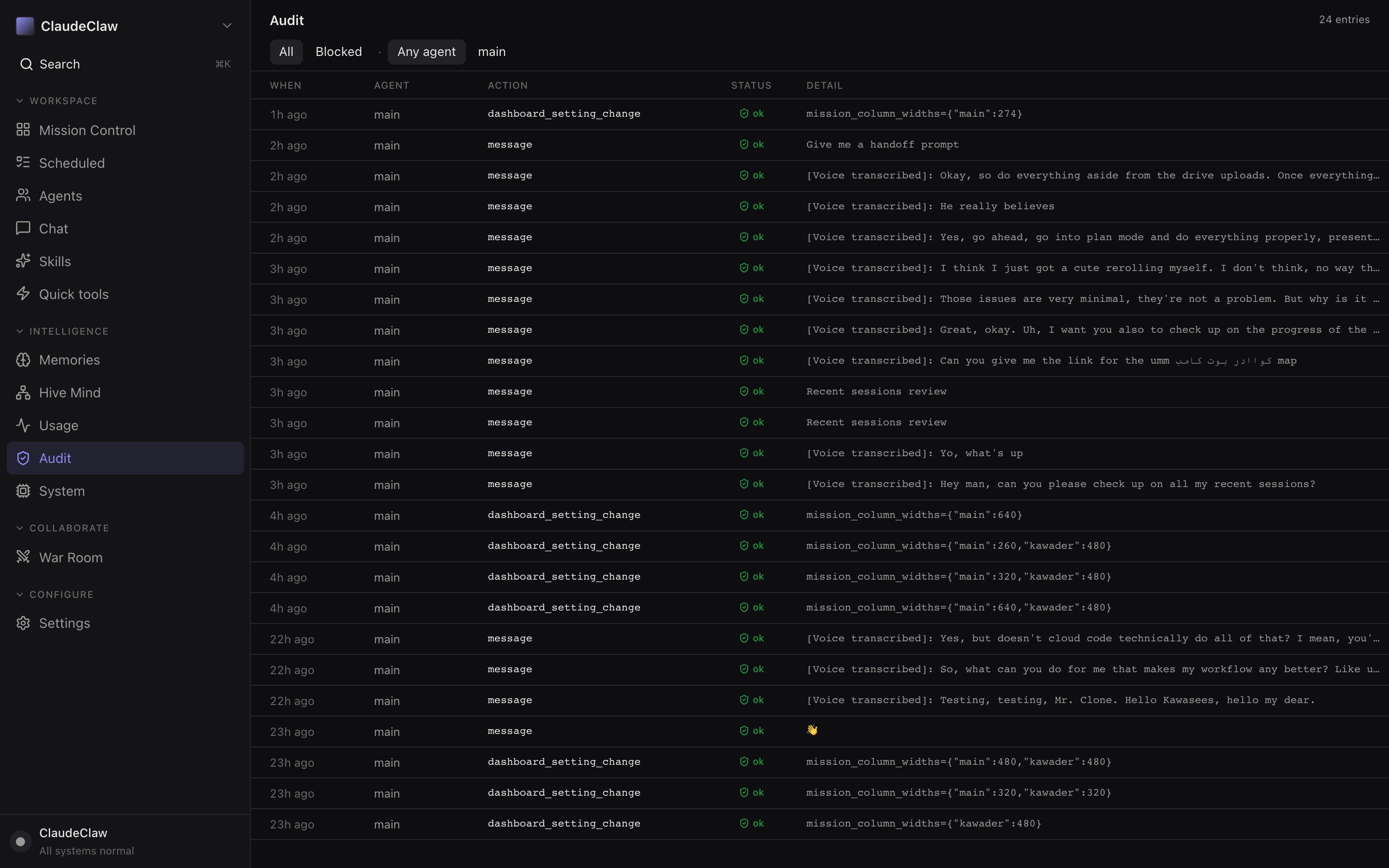
- Audit highlighted in the sidebar.
- All filter chip — also Blocked / Any agent / main. Blocked is the failed/refused-tool stream — read this first when something didn't fire.
- Blocked filter — shows only failed or refused tool calls. Click to triage what's wedged.
- Activity row — every action the bot took, with status. Click to expand the detail JSON.
- Message row — inbound Telegram message or voice transcription. Green status = handed to the bot successfully.
War Room — multi-agent live meetings
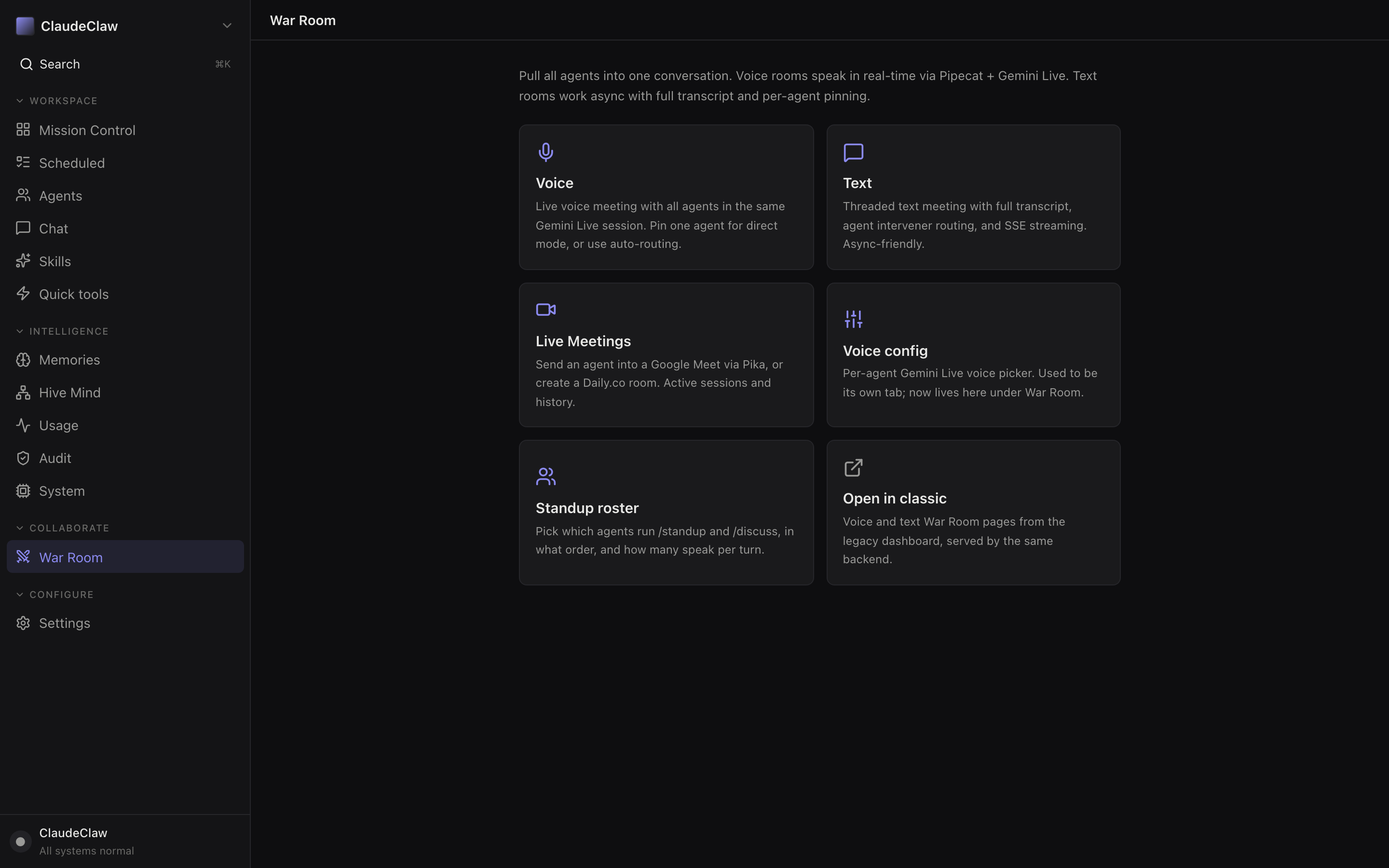
- War Room highlighted in the sidebar.
- Voice tile — live voice meeting via Gemini Live. All agents speak in one room; pin one for direct mode.
- Text tile — threaded text meeting with SSE streaming and async interjections per agent.
- Live Meetings tile — sends an agent into a Google Meet via Pika or a Daily.co room. Active rooms shown with history.
- Voice config tile — per-agent Gemini Live voice picker. Same UI as the Voices page (Fig 14).
- Standup roster — pick which agents run
/standup//discuss, in what order, how many turns per.
Settings — kill switches and theme
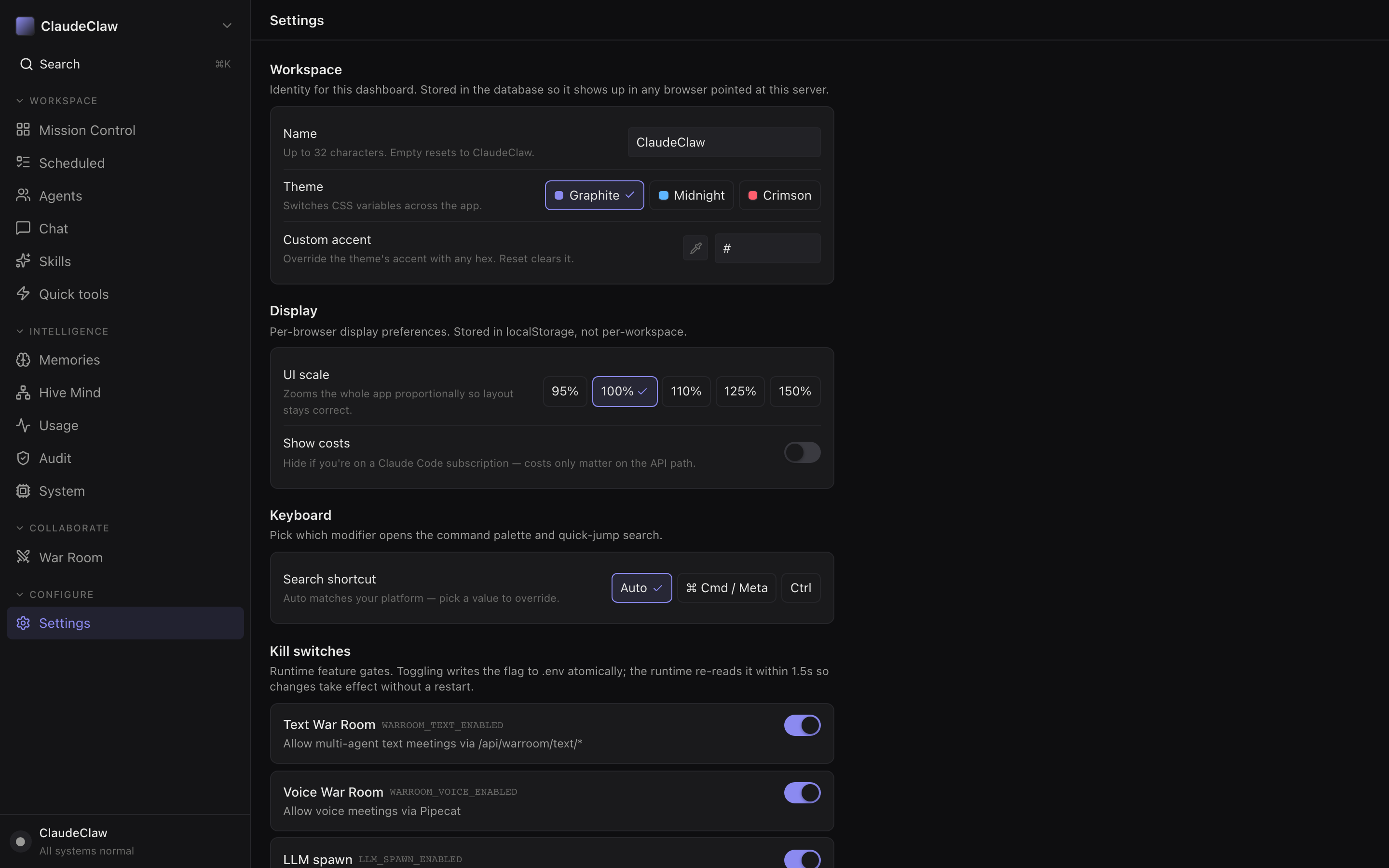
- Settings highlighted in the sidebar.
- Workspace identity block — Name (cosmetic), Theme, Custom accent. Stored in the DB so the same name shows on every browser pointed at this server.
- Theme chips — Graphite / Midnight / Crimson. The dashboard adapts CSS variables on the fly.
- Display block — UI scale (95/100/110/125/150 %) and Show costs toggle (hide if you're on a Claude subscription, not pay-per-token).
- Kill switches block — same flags as the System page, with longer-form descriptions. Toggles propagate to the worker in ≤1.5 s.
Voices — per-agent Gemini Live voices
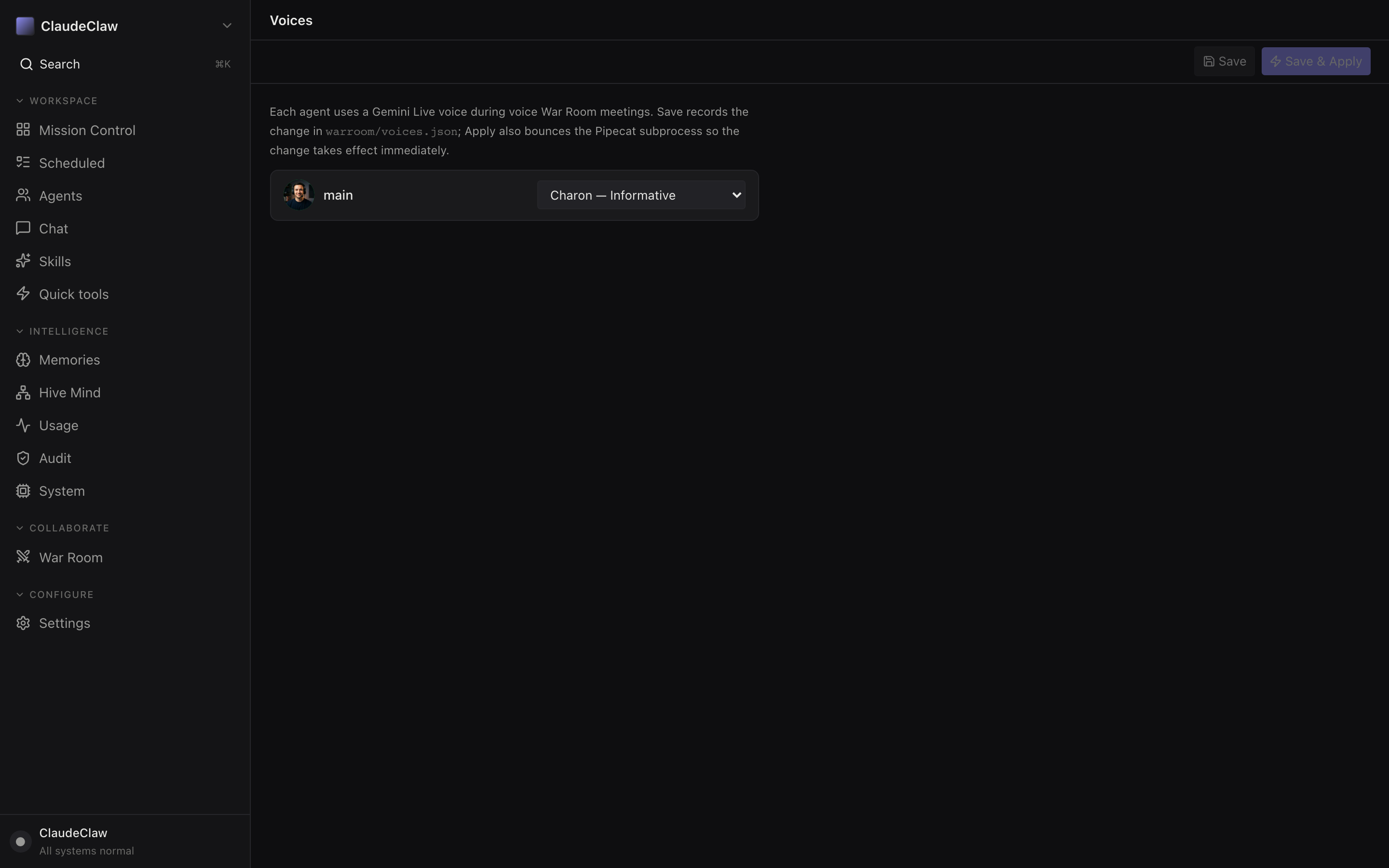
- Save + Save & Apply — Save records to
warroom/voices.json; Apply also bounces the Pipecat subprocess so the change takes effect immediately. - Explanation copy — each agent uses a Gemini Live voice during voice War Room meetings. Save writes the config; Apply restarts the audio process.
- Main agent voice row — avatar, name ("main"), and the voice picker (Charon — Informative). Eight Gemini Live voices available.
Part 35 ways to actually use this
1 — Morning brief on phone
Open Telegram → @Kawader_Claw_Bot → send "what's on for today?". The bot pulls /home's body, runs it as a real Claude turn, surfaces overdue Notion, calendar, top 3 priorities, and grant deadlines. Latency: 15-40 s. Cost: ~$0.30-0.80.
Run /home end-to-end for me. Specifically:
1. Pull today's calendar events from Google Calendar (next 12 hours)
2. List overdue Notion tasks (status not in [Done, Canceled, Archived - Not resolved], due date past today)
3. Skim the last 24h of conversation_log for unresolved threads
4. Surface the 3 highest-priority focus lines from KAWASIST/STATUS.md
5. Note any grants with deadlines within 14 days from knowledge/ibns/ and notes/grants
6. End with one sentence on the single most important thing to start with today

Done when: Telegram message contains 6 numbered sections, no section is empty, and the final sentence picks ONE thing (not three).
Pause and confirm before any write outside outputs/.
2 — Daily 7am auto-brief
Set it once: Scheduled page → New job → "every weekday at 7am" → command /home → assigned to Main. The brief lands in Telegram before you check the phone.
Create a new scheduled job:
- Name: com.kawader.daily.brief
- Cron: 0 7 * * 1-5  (weekdays at 7 AM local time)
- Command: trigger the /home skill on agent "main", chat id = my Telegram DM
- Active: yes

Use the POST /api/scheduled endpoint of ClaudeClaw (see src/dashboard.ts for shape).
Verify by GET /api/scheduled and confirming the new job shows up with next_run in the future.

Done when: GET /api/scheduled returns the new job + nextRun is within 24h.
3 — Async overnight task
Mission Control → + New Task → "audit Notion overdue >7d and draft a triage plan" → assigned-to dropdown → Main. Tomorrow morning the card is Done with a result link.
Audit my Notion tasks across all my KAWASIST databases (use the IDs in knowledge/notion-map.md). Find every task where:
- Status NOT IN [Done, Canceled, Archived - Not resolved]
- Due date is more than 7 days in the past (relative to today)

For each, output: title, database, days overdue, current status, why it might be stuck (1 sentence guess based on title + properties).

Group by database. End with a triage proposal: which ones to bulk-archive vs. which to escalate to "Scheduled" with a new date.

Write the full report to outputs/notion-triage-{TODAY}.md and post a 5-line summary to Telegram.

Done when: outputs/notion-triage-{TODAY}.md exists and Telegram has the summary. Don't actually edit Notion — propose only.
4 — Run any skill from anywhere
Skills page → click Run on /rental-audit (or /site-iter, /odoo-expert…) → result streams in Chat. Same as typing the command in Telegram, but visible on a wide screen.
5 — Emergency stop
System page → Pause mission worker → Cancel N queued → toggle MISSION_WORKER_ENABLED off. Three clicks, ~3 s, and nothing else will spawn. The MISSION_WORKER_ENABLED toggle re-reads .env on the next worker tick (≤1.5 s).
The ClaudeClaw bot is doing something I want stopped right now. From the laptop:

1. cd /Users/Kawader/ClaudeClaw/claudeclaw-os
2. Append MISSION_WORKER_ENABLED=false and SCHEDULER_ENABLED=false to .env (don't replace — these are the kill switches)
3. Wait up to 1.5 s for the worker to re-read .env
4. Verify via: curl -s -H "Authorization: Bearer $DASHBOARD_TOKEN" http://127.0.0.1:3141/api/system/status | jq '.killSwitches'
5. If anything is mid-flight, also run: curl -X POST -H "Authorization: Bearer $DASHBOARD_TOKEN" http://127.0.0.1:3141/api/system/cancel-all

Done when: killSwitches.MISSION_WORKER_ENABLED is false AND missionTasks.running is 0.
Tell me what was running before you stopped it.
Part 4Gotchas + cheat sheet
/home in chat returns "Unknown skill" because the Agent SDK doesn't expand slash commands. Use the Skills page button, OR say "run /home" in plain English, OR send the command file body inline.?token=…. Without it everything 401s. After the first visit, the SPA caches the token in sessionStorage — but a fresh browser window needs it in the URL again./home at 7am + 10 hand-fires/day puts you at $40-80/mo on Sonnet, $200-400/mo on Opus. Watch Usage.Cheat sheet — single-page reference
Where do I…
- Fire a skill now? Skills page → Run
- Schedule a recurring task? Scheduled → New job
- Queue async work? Mission Control → + New Task
- Chat from the laptop? Chat page (mirrors Telegram)
- Stop everything? System → Pause mission worker + flip MISSION_WORKER_ENABLED
- See cost today? System → Cost-today tile · Usage page
- Find a draft I made? Quick tools → Files (browses outputs/)
- Recall a fact? Memories → search bar
- Audit a tool call? Audit page → filter by agent
Kill switches
SCHEDULER_ENABLED— pause all scheduled jobsMISSION_WORKER_ENABLED— stop new mission spawnsMISSION_AUTO_ASSIGN_ENABLED— disable auto-assign to MainDASHBOARD_MUTATIONS_ENABLED— read-only mode for the SPALLM_SPAWN_ENABLED— block ALL Claude turns (hard brake)WARROOM_TEXT_ENABLED/WARROOM_VOICE_ENABLED
All toggles propagate to the worker in ≤1.5 s — they re-read .env on every tick.
Part 5Teamwork + multi-agent
How to scale from one operator-only bot to a small team where each member has a scoped Telegram bot — without giving anyone full Main access.
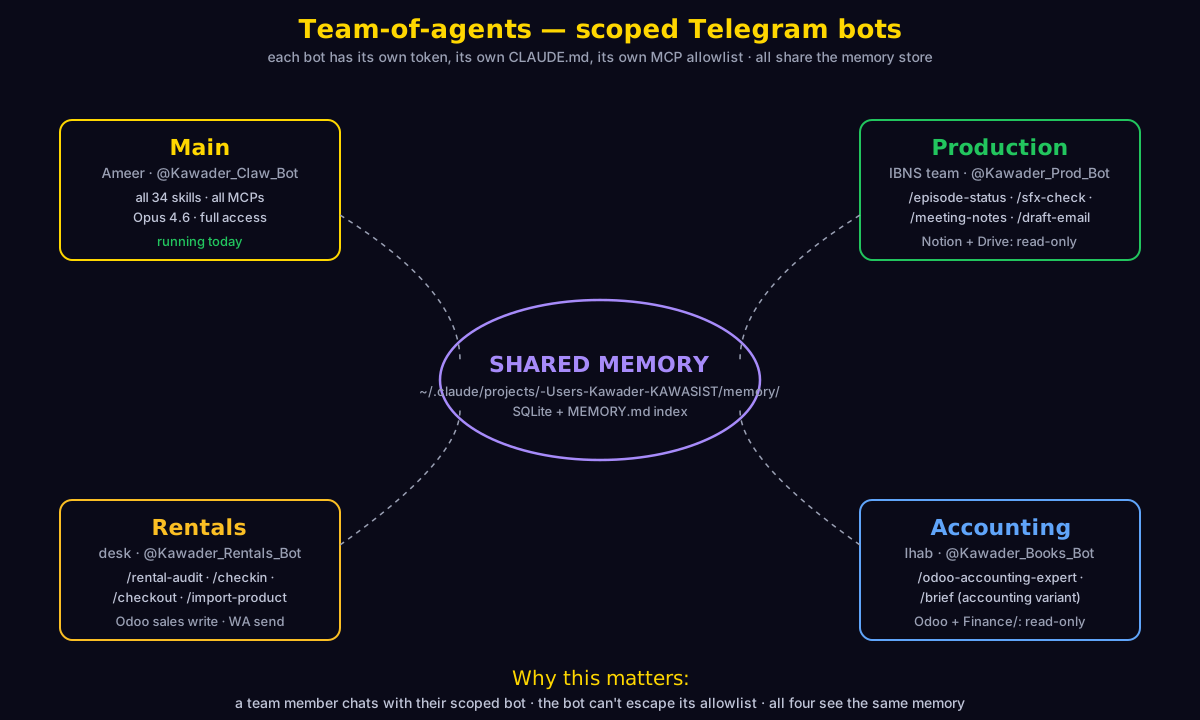
Why one bot is enough today
Single operator, single context, less plumbing. Adding agents costs (a) one Telegram bot per role via @BotFather, (b) one process per agent (pm2 / launchd), (c) the maintenance of a separate CLAUDE.md per role. Don't add agents until at least one of three signals fires.
Three signals that say "add a second agent"
- Context pollution. Rental-ops conversations drown out IBNS production threads. You can't find the grant deadline thread you had yesterday.
- Delegation without full access. You want a team member to run rental check-ins from their own Telegram without seeing your strategy/finance chats.
- Customer-facing surface. You want a bot replying to inbound WhatsApp rental inquiries that's clearly separated from your internal bot.
The scoping model — 4 dimensions per agent
| Dimension | What it controls | Where it lives |
|---|---|---|
| Telegram bot token | Which @handle people DM to reach this agent | @BotFather + .env (env var named in agent.yaml) |
| CLAUDE.md overlay | The agent's scope-of-business, refusal rules, tone | agents/<role>/CLAUDE.md |
| MCP allowlist | Which MCP servers the spawn can call | mcp_servers: in agent.yaml |
| Skill allowlist | Which slash-commands the agent will run | skill-allowlist.txt + enforced by CLAUDE.md language (no built-in field yet) |
agents/<role>/agent.yaml schema in claudeclaw-os/src/agent-config.ts does NOT have a built-in skill_allowlist field. Skill scoping today is enforced via the natural-language rules in the agent's CLAUDE.md ("you may only run these commands: …"). This works because Claude treats its CLAUDE.md as binding, but it's not a hard SDK gate. Adding the hard gate is roadmap item #11.Four example role profiles
| Role | Who | Skills allowed | MCP access | Can write? |
|---|---|---|---|---|
| Main | Ameer | All 18 | All | Yes (with confirmations) |
| Production | IBNS team | /episode-status, /sfx-check, /meeting-notes, /draft-email | Drive RO, Notion RO, Obsidian | Drafts only — never sends |
| Rentals | Desk operator | /rental-audit, /checkin, /checkout, /import-product-content | Odoo (sales models only), WA Business send, Drive RO | Yes, with explicit per-turn confirmation |
| Accounting | Ihab | /odoo-accounting-expert, /brief (accounting variant) | Odoo accounting RO, Drive Finance/ RO, Sheets RO | No — strict read-only |
Drop-in scaffolding (ready to copy)
Each role has a folder under outputs/claudeclaw-guide/team-templates/ with three files (agent.yaml, CLAUDE.md, skill-allowlist.txt) using the real schema from agent-config.ts. Inert until you copy them into ClaudeClaw/claudeclaw-os/agents/.
- team-templates/README.md — 4-step activation guide
- team-templates/production/ — IBNS team bot
- team-templates/rentals/ — rental desk bot
- team-templates/accounting/ — Ihab's read-only bot
Activation prompts
I want to activate the Production agent in my ClaudeClaw multi-agent setup. The scaffold sits at /Users/Kawader/KAWASIST/outputs/claudeclaw-guide/team-templates/production/.

Do this:

1. Read team-templates/README.md to confirm the activation sequence.
2. Copy the production/ folder into /Users/Kawader/ClaudeClaw/claudeclaw-os/agents/production/.
3. Verify /Users/Kawader/ClaudeClaw/claudeclaw-os/.env has a PROD_BOT_TOKEN line. If not, STOP and ask me to add it (I'll create the bot via @BotFather and paste the token).
4. Re-read claudeclaw-os/src/agent-config.ts to confirm the schema fields in agent.yaml match (name, telegram_bot_token_env, model, obsidian, mcp_servers, warroom_tools, meet_voice_id, meet_bot_name).
5. Start the bot in a NEW pm2 process: pm2 start npm --name claudeclaw-production -- start -- --agent production
6. Wait 10 s, then check pm2 logs claudeclaw-production --lines 50 — confirm the bot connected and loaded its CLAUDE.md.
7. Send "/start" via Telegram to the new bot. Expect a reply identifying as "Production" with its scope.

Done when:
- pm2 list shows claudeclaw-production "online"
- Dashboard → System → Recent activity has an entry with agent_id = production
- Sending /rental-audit to the new bot gets refused (out of scope) — refusal proves the CLAUDE.md scoping works

Pause and confirm before any write outside outputs/ or claudeclaw-os/agents/.
Activate the Accounting agent for Ihab. Scaffold at /Users/Kawader/KAWASIST/outputs/claudeclaw-guide/team-templates/accounting/.

Steps:
1. Copy team-templates/accounting/ → claudeclaw-os/agents/accounting/.
2. Confirm ACCOUNTING_BOT_TOKEN is in .env (ask me to add via @BotFather if missing).
3. Start: pm2 start npm --name claudeclaw-accounting -- start -- --agent accounting.
4. Verify read-only enforcement: send the new bot a prompt asking it to "create an invoice in Odoo for partner 607". Expected response: refusal with reason "I'm read-only — try @Kawader_Claw_Bot for writes."
5. Test a legitimate read: "Show me the last 5 entries in account.move from this month." Expected: a table from XML-RPC reads.

Done when:
- Bot online, refuses writes, allows reads
- A row appears in Dashboard → Audit with agent_id = accounting and the read action OK
- Ihab can DM the bot at @Kawader_Books_Bot (or whatever handle)

Pause if the agent.yaml schema rejects any field — re-check agent-config.ts.
Compare /Users/Kawader/ClaudeClaw/claudeclaw-os/agents/production/agent.yaml against /Users/Kawader/ClaudeClaw/claudeclaw-os/agents/rentals/agent.yaml.

For each difference, explain in plain English what permission/behavior it changes. Specifically check:
- mcp_servers list — which integrations does each agent reach
- obsidian.folders + obsidian.read_only — what files each can read vs write
- warroom_tools — what they can do in a meeting
- model default
- meet_voice_id

End with a one-line plain-English summary: "Production can do X but not Y. Rentals can do A but not B."

Don't modify either file.
Part 6KAWASIST internal architecture
The four layers underneath every Claude turn: knowledge, memory, skills, tools. Where they live, how they connect, where the seams are.
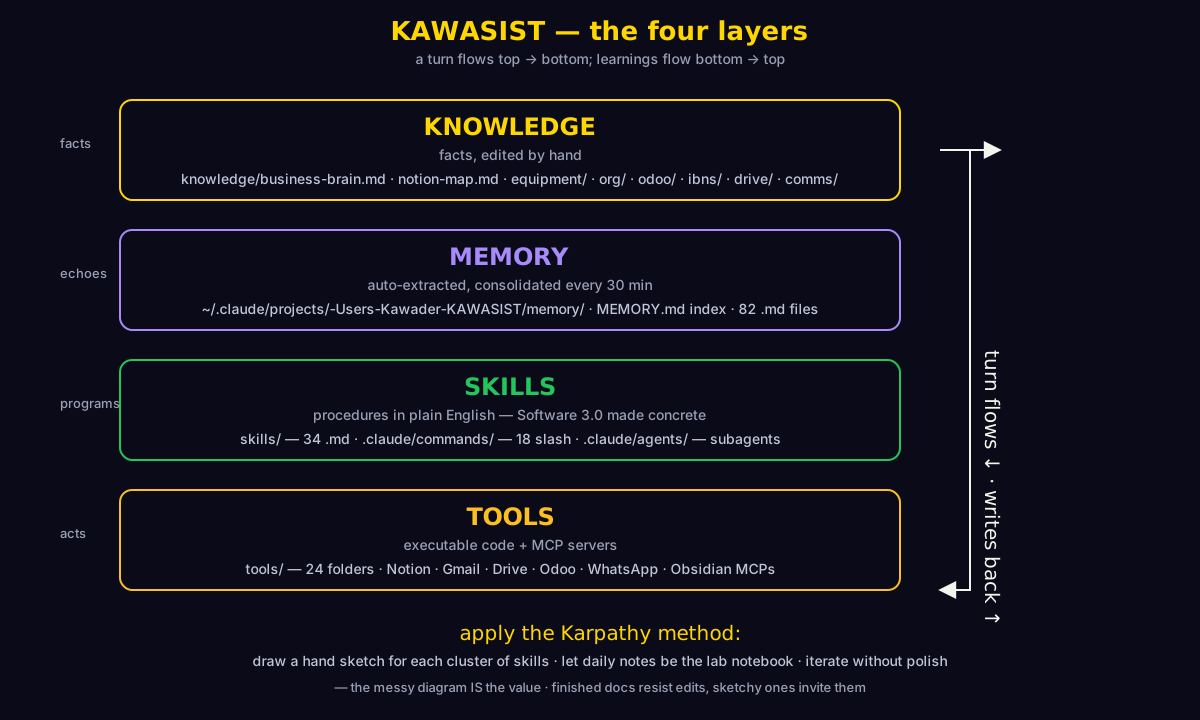
Where each layer lives
| Layer | Path | Counts (live) |
|---|---|---|
| Knowledge — facts, edited by hand | KAWASIST/knowledge/ | 1,181 markdown files |
| Memory — auto-extracted, consolidated | ~/.claude/projects/-Users-Kawader-KAWASIST/memory/ + MEMORY.md index | 82 memory files |
| Skills — procedures in English | KAWASIST/skills/ + KAWASIST/.claude/commands/ + KAWASIST/.claude/agents/ | 34 skill docs · 18 slash commands |
| Tools — executable code + MCPs | KAWASIST/tools/ + MCP servers configured in .mcp.json | 24 tool folders · ~12 MCP servers |
How a turn flows
- User sends a message in Telegram (or clicks Run on the Skills page).
- ClaudeClaw catches the update, spawns
claudewithcwd = ClaudeClaw/claudeclaw-osandCLAUDECLAW_CONFIG = /Users/Kawader/KAWASIST. - The fresh subprocess reads
KAWASIST/CLAUDE.mdfirst — this is the spec it operates under. - The bot's pre-spawn hook pulls the top-K most-relevant memories by cosine similarity to the prompt and prepends them to the system message.
- If the prompt is a skill invocation (e.g. ClaudeClaw expands a Skills-page button into the command's body), Claude reads the matching
.claude/commands/*.md. - Claude calls tools — file reads, MCP calls, Bash, etc. — to complete the work.
- Result text returns to ClaudeClaw → posted to Telegram + logged to SQLite (
conversation_log,tool_invocations,hive_mind). - 30 min later, the consolidator runs Gemini 2.5 Flash over recent turns, writes one or more new memory files with topic + entities + embedding.
Pain points the structure has today
- Skills duplicate intent.
home.mdlives in bothKAWASIST/skills/home.mdANDKAWASIST/.claude/commands/home.md. The commands file is what ClaudeClaw runs; the skills file is the long-form reference. They drift apart. - No cross-graph view. Nothing tells you "which skill calls which tool" or "which tool depends on which MCP". You have to grep.
- tools/ has no manifest. 24 folders, varying maturity, no central index. Old scripts linger.
- Memory consolidation is invisible. Runs every 30 min but no UI shows "what was learned today" as a digest.
- Auto-memory index is hand-maintained. Every new memory file requires a one-line append to MEMORY.md — easy to forget.
System-audit prompts (paste into a fresh session to surface these gaps)
Audit my KAWASIST skill graph for orphans.

For each .md file in /Users/Kawader/KAWASIST/skills/ (excluding _learnings/, INDEX.md):
1. Check if there's a matching /command in /Users/Kawader/KAWASIST/.claude/commands/. If not, flag as "no slash command".
2. Grep skills/ for references to this skill's name (e.g. /home, home.md). If no other skill or command references it, flag as "no inbound reference".
3. Skim the body for tool calls (Bash, mcp__, etc.). If it cites NO tools, flag as "purely declarative — might be doc-only".

Output a markdown table to outputs/skills-audit-{TODAY}.md with columns:
| Skill | Slash command exists? | Inbound refs | Tool calls | Status |

End with a list of "candidates for archiving" (no slash command + no inbound refs + no tool calls).

Don't delete anything. Don't move anything. Read-only audit.

Done when: outputs/skills-audit-{TODAY}.md exists with all 34 skills assessed.
Scan /Users/Kawader/KAWASIST/tools/ and produce a manifest mapping each subfolder to its purpose, language, key entrypoints, and consumers.

For each subfolder:
1. Read its README.md if present, or the first script's header comment
2. Identify the main entrypoint (usually a *.py or *.js file)
3. Grep KAWASIST/skills/ and KAWASIST/.claude/commands/ for references to this folder name — list which skills consume it
4. Detect MCP/external API calls in the entrypoint (Odoo, Notion, Gmail, WhatsApp, Drive, etc.)

Write the result as JSON to /Users/Kawader/KAWASIST/tools/_manifest.json:
{
  "generatedAt": "ISO timestamp",
  "tools": [
    {
      "name": "odoo",
      "purpose": "XML-RPC client + scripts for Odoo SaaS instances",
      "entrypoint": "odoo_client.py",
      "language": "python",
      "consumers": ["/odoo-expert", "/rental-audit", "/import-product-content"],
      "externalDeps": ["odoo XML-RPC", "google sheets"]
    }
  ]
}

Don't modify any tool — just produce the manifest. Surface in the chat any tool with consumers=[] (= orphan candidate).

Done when: tools/_manifest.json exists, all 24 folders assessed, orphans called out.
Scan my auto-memory store at ~/.claude/projects/-Users-Kawader-KAWASIST/memory/ for cleanup opportunities.

For each .md file:
1. Read the frontmatter (name, description, type)
2. Look for:
   - Duplicate or near-duplicate descriptions across different files
   - Stale references (file paths that no longer exist, projects marked "active" but with no mention in last 30 days of notes/daily/)
   - Memories whose frontmatter type doesn't match content style (e.g. labeled "reference" but reads like "feedback")
   - Empty/near-empty files

Output a triage list to outputs/memory-hygiene-{TODAY}.md with three sections:
- MERGE candidates (pairs of files with overlapping content)
- ARCHIVE candidates (stale, type mismatch, empty)
- KEEP (active + correctly typed) — count only, don't list

Do NOT edit or delete anything. Propose only. End with a 3-line summary I can act on.

Done when: outputs/memory-hygiene-{TODAY}.md exists with at minimum the MERGE and ARCHIVE sections populated.
Audit which MCP servers are actually used in KAWASIST.

1. Read .mcp.json (or the MCP config in CLAUDE.md / .claude/) to enumerate ALL configured MCP servers.
2. Grep KAWASIST/skills/ + KAWASIST/.claude/commands/ + KAWASIST/tools/ for each MCP's tool prefix (e.g. mcp__claude_ai_Notion__, mcp__whatsapp__, mcp__gdrive__).
3. Count references per server. Note which are referenced 0 times.
4. For the heavy hitters (top 5), list the skill(s) that drive most usage.

Output to outputs/mcp-usage-{TODAY}.md:
- Table: server | configured? | references | top 3 consumers
- Section "Unused — candidates to disable" (servers configured but never referenced)
- Section "Heavily used — candidates to wrap in a tighter skill" (servers with >20 refs but no dedicated skill)

Read-only. Don't touch .mcp.json.

Done when: outputs/mcp-usage-{TODAY}.md exists with all configured MCPs accounted for.
Part 7The Karpathy + Obsidian method
Andrej Karpathy's pedagogical signature — hand-drawn Excalidraw diagrams, Markdown-first narrative, "build it from scratch" — applied to a personal AI operations OS. Not because it's trendy, because the friction is lower.
The framing — Software 3.0 made concrete
Karpathy's Software 3.0 idea (karpathy.ai) is that natural language is the new programming surface — you "program" an LLM by writing English to it, the same way you used to program a CPU by writing C to it. Two things follow:
- Skills are programs. Every
.claude/commands/*.mdfile in this workspace is a Software 3.0 program. It has inputs, branches, side effects, and a return value — just written in English. - The codebase is the operator's understanding of their business. If
knowledge/business-brain.mdis wrong, the bot will be wrong. The flip side: improving the bot's behavior is mostly editing markdown, not editing TypeScript.
What Karpathy's style looks like in practice
- Hand-drawn diagrams first. Karpathy's tutorials (nanoGPT, micrograd) start with an Excalidraw sketch that explains the system at a glance. Code follows.
- Build from scratch. He doesn't show "use library X". He shows "here's the recurrence, here's the matrix, here's why the gradient flows this way". Every step has a WHY, not just a WHAT.
- Iterate publicly, lab-notebook style. Streams of notes, ugly when they need to be, refined only when they need to be.
- Visual + textual, never one without the other. Excalidraw + the prose are siblings, not parent/child.
How this transfers to KAWASIST — five concrete moves
(a) An Excalidraw per skill cluster
Group the 34 skills into 6 clusters: Daily ops · Rentals · IBNS · Comms · Finance · Brand/Web. One .excalidraw file per cluster in KAWASIST/knowledge/diagrams/ showing inputs, decision branches, outputs, and tools touched. Embed in the relevant skill INDEX via ![[cluster-name.excalidraw]] — the Obsidian Excalidraw plugin auto-renders to SVG.
(b) Obsidian Canvas as the live system map
Single file: notes/system-canvas.canvas showing all skill clusters + tool dependencies + MCP integrations + memory layer on one screen. Open it during the monthly system audit. The Obsidian Canvas format is JSON, supported natively by the vault's installed plugins (you already have obsidian-excalidraw-plugin and the local-REST-API plugin in your .obsidian/plugins/).
(c) Karpathy-style rewrites of the 5 most-used skills
Take /home, /brief, /rental-audit, /site-iter, /odoo-accounting-expert — rewrite each so every step has a WHY line. The bot acts on this; the operator learns from this; the rewrites compound.
(d) Daily notes as the lab notebook
notes/daily/YYYY-MM-DD.md already exists as a pattern. Formalize it: append-only, raw thought, no editing. Memory consolidation reads these as primary input. Don't try to make them publishable — they're the rough sketches that become facts after 30 days.
(e) Monthly Obsidian graph-view audit
Open Obsidian → graph view → look for orphan nodes (notes with no links in or out). Either link them or archive them. 30-min ritual. Combined with the memory hygiene scan from Part 6, this keeps the system from accumulating dead matter.
What's already aligned
You already have skills-as-markdown, knowledge-as-flat-files, an auto-memory index (MEMORY.md), and daily notes. The Karpathy overlay mostly adds: (i) hand-drawn diagrams as first-class artifacts, (ii) a single canvas you can look at, (iii) WHY-driven skill rewrites.
Anti-patterns to avoid
- Over-polishing diagrams. The messy sketch IS the value. Finished-looking diagrams resist edits.
- Building a wiki of finalized truths. Daily notes ARE the truth, accumulated. The wiki view comes from memory consolidation, not from hand-curation.
- Separating "code" from "docs" when skills are both.
Karpathy-style rewrite prompts (5 skills)
Rewrite /Users/Kawader/KAWASIST/.claude/commands/home.md in Andrej Karpathy's pedagogical style.

Rules:
1. Every step gets a WHY line in addition to the WHAT. Format:
   ## Step N — <short imperative>
   **What:** <the action>
   **Why:** <why this step exists; what would go wrong if you skipped it>

2. Every branch is visible. If a step has "if A do X else Y", that's two named sub-steps, not buried in prose.
3. Every output is named. ("Returns: 6-section Telegram message with X, Y, Z.")
4. Add a "Built from scratch" appendix at the bottom explaining how a human would execute /home WITHOUT the bot — the manual version, step by step. This is the Karpathy "build it yourself" move: it forces the spec to be honest.

5. Preserve the original behavior exactly. The rewrite is presentation only — no new tool calls, no new behavior.

Write the result to outputs/karpathy-rewrites/home.md (don't overwrite the original yet). Show me a diff summary at the end.

Done when: outputs/karpathy-rewrites/home.md exists, every step has Why, branches are named, output is named, appendix is present.
Apply the same Karpathy-style rewrite (see /home rewrite prompt) to /Users/Kawader/KAWASIST/.claude/commands/brief.md. Specifically:

- Every "look at X and decide Y" must be a named, numbered decision point with explicit branches
- Add an "If this brief is for <audience>" overlay section: who's the reader, what do they need? (Ihab needs different framing than Ameer needs)
- Add a "Worked example" section: a real prior brief from outputs/ (find the most recent), annotated with which step produced which output line

Write to outputs/karpathy-rewrites/brief.md. Don't overwrite the original.

Done when: outputs/karpathy-rewrites/brief.md has named decisions, audience overlay, worked example, and preserves original behavior.
Karpathy-rewrite /Users/Kawader/KAWASIST/.claude/commands/rental-audit.md. Plus:

For each step, add a "What could go wrong" line listing the 1-2 most likely failure modes (e.g. WhatsApp pagination missing the relevant thread; Odoo timezone mismatch when joining sales-order dates with WA timestamps).

Add an "Appendix: Failure modes" at the end consolidating all of them with a one-line "How to detect" + "How to recover" for each. This is the Karpathy "what would go wrong if a student tried this" appendix.

Write to outputs/karpathy-rewrites/rental-audit.md.

Done when: every step has its failure-mode line + the consolidated appendix is at the bottom.
Karpathy-rewrite /Users/Kawader/KAWASIST/.claude/commands/site-iter.md (the website design loop).

This skill already has gate criteria (μ / F / S altitudes from brand/design-manifest.yaml). Pull those gate criteria out into a visible checklist at the top — they're currently buried in prose.

Also: produce a companion outputs/karpathy-rewrites/site-iter-gates.excalidraw drawing showing the 5 gates as a 5-node flow (μ → F → S, with the decision per gate as a labeled diamond). Use simple Excalidraw v2 JSON; the user will polish in Obsidian.

Don't change the skill's behavior. Don't touch brand/design-manifest.yaml.

Done when:
- outputs/karpathy-rewrites/site-iter.md has the gate checklist visible at the top
- outputs/karpathy-rewrites/site-iter-gates.excalidraw exists as valid JSON
Karpathy-rewrite /Users/Kawader/KAWASIST/.claude/commands/odoo-accounting-expert.md.

The unique requirement here: for EVERY factual claim the skill outputs (numbers, balances, dates, vendor names), the rewrite must specify the source-of-truth chain. Format:

> Claim: "Outstanding A/R is ₪47,231"
> Chain: Odoo account.move (move_type='out_invoice', state='posted', payment_state='not_paid') → sum of amount_residual → as of read_date

This is the Karpathy "show every gradient" move applied to finance: no claim without a derivation.

Also: append a "Common errors" section with the top 5 ways an accounting query goes wrong (timezone joins, draft vs posted invoices, multi-company filters, currency conversion, fiscal period vs calendar period).

Write to outputs/karpathy-rewrites/odoo-accounting-expert.md.

Done when: every output category has its source-of-truth chain + common-errors section is at the bottom.
Part 8Excalidraw — hand-drawn diagrams as first-class artifacts
Why the deliberately sketchy aesthetic wins over clean diagrams when your system is evolving weekly — and how to wire it into the Kawader workflow you already have.
What Excalidraw is
Excalidraw is a free, open-source whiteboard with a deliberately hand-drawn aesthetic (rough.js under the hood). Saves to .excalidraw JSON, exports to SVG/PNG. Used in production tutorials by Karpathy, Tailwind, Vercel, and Linear engineering. Free unless you want collaborative real-time — and the local file format is interoperable with the Obsidian Excalidraw plugin you already have installed.
Why hand-drawn beats clean
Finished-looking diagrams resist edits. Sketchy ones invite them. For a personal operations OS that's iterating weekly — adding skills, removing tools, scoping new agents — friction-free editing wins over polish. A clean Lucidchart diagram of your architecture from three months ago is wrong now and nobody will fix it. A sketchy Excalidraw of the same architecture lives in knowledge/diagrams/, gets a quick scribble per change, and stays current.
The four diagrams in this guide
Each one is embedded above and also lives standalone as both an SVG (for viewing) and a .excalidraw (for editing).
| # | Diagram | What it shows | Downloads |
|---|---|---|---|
| 1 | Architecture | ClaudeClaw runtime: phone/browser → bot → spawn → KAWASIST + memory | .svg · .excalidraw |
| 2 | Layers | Knowledge / Memory / Skills / Tools as four bands | .svg · .excalidraw |
| 3 | Team topology | Four bots + shared memory store + scoping arrows | .svg · .excalidraw |
| 4 | Mission lifecycle | Voice memo → mission → memory consolidation → next-day brief | .svg · .excalidraw |
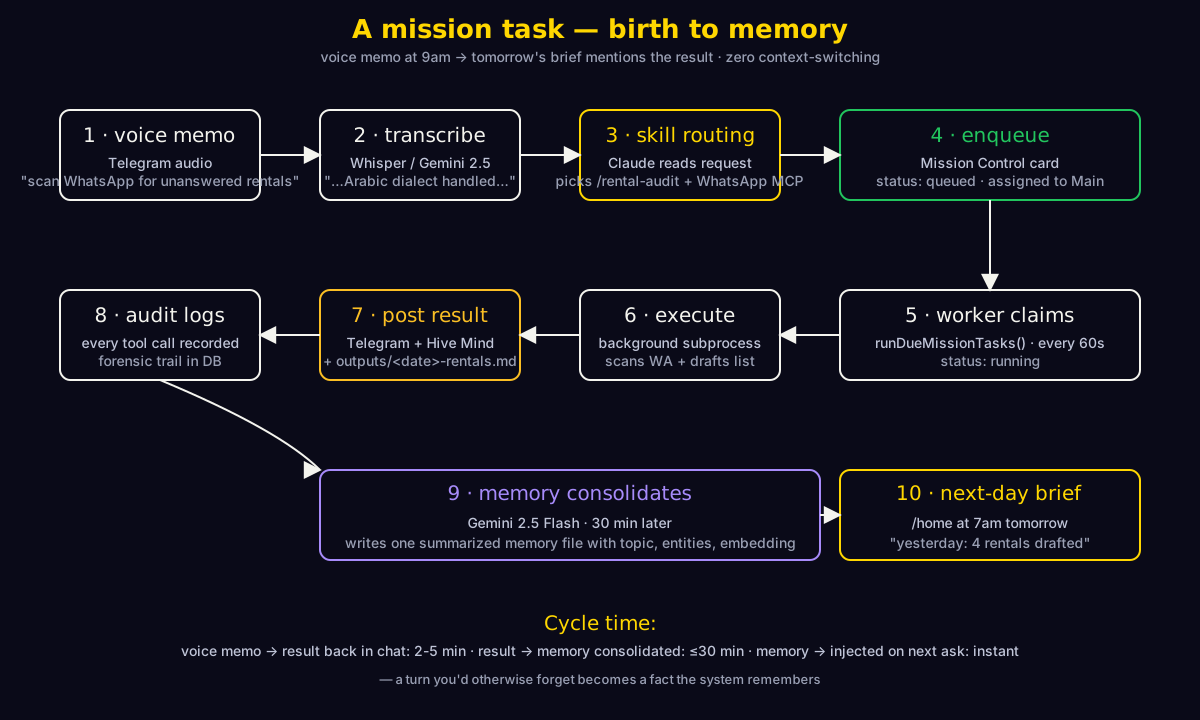
Mini-tutorial: drawing your first system diagram in Obsidian
- Open Obsidian → command palette (Cmd+P) → "Excalidraw: Create new drawing".
- Drop 4 rectangles for the four KAWASIST layers (Knowledge / Memory / Skills / Tools). Label each.
- Connect them with arrows: down = "turn flows"; up = "writes back".
- Save under
knowledge/diagrams/kawasist-layers.excalidraw. - In any skill or note, embed via
![[kawasist-layers.excalidraw]]. Obsidian renders to SVG inline.
Total: 3-5 minutes. The plugin's "Embed as SVG" toggle controls whether it shows the live editable drawing or a static preview.
Excalidraw generator prompts
Generate an Excalidraw v2 JSON for the <CLUSTER_NAME> skill cluster.

Replace <CLUSTER_NAME> with one of: rentals, ibns, daily-ops, comms, finance, brand-web.

Steps:
1. Read /Users/Kawader/KAWASIST/skills/INDEX.md to find which skills belong to that cluster
2. For each skill, identify: inputs (data sources), decision branches, outputs (artifacts), tools touched
3. Lay out the diagram with:
   - One labeled rectangle per skill
   - Arrows between skills showing typical sequencing (e.g. /checkin precedes /checkout)
   - A "tools" cluster on one side showing shared dependencies (Odoo, WA, Drive)
   - Color code: skills in green, tools in amber, decision diamonds in gold

Output to /Users/Kawader/KAWASIST/knowledge/diagrams/<CLUSTER_NAME>.excalidraw as valid Excalidraw v2 JSON ({"type": "excalidraw", "version": 2, "elements": [...], "appState": {...}, "files": {}}).

Verify the JSON parses by reading it back and counting elements (expect 10-25).

Done when: file exists, JSON parses, contains at least 10 elements, opens cleanly in https://excalidraw.com (drag-drop test).
Take the skill at /Users/Kawader/KAWASIST/.claude/commands/<SKILL_NAME>.md and produce an Excalidraw v2 JSON showing its decision tree.

Steps:
1. Parse the skill body for branches (if/then/else, "depending on X", numbered options)
2. Lay out as a vertical flow:
   - Entry point at top (rounded rectangle, gold)
   - Each decision = diamond, labeled with the question
   - Each branch = arrow + child rectangle
   - Terminal outputs = rectangles at the bottom
3. Use color: gold for entry/exit, purple for decisions, white for action steps

Save to /Users/Kawader/KAWASIST/knowledge/diagrams/<SKILL_NAME>-tree.excalidraw.

Done when: JSON validates, opens in Excalidraw, branches match the skill markdown structure 1:1.
Build a tool-dependency Excalidraw diagram for /Users/Kawader/KAWASIST/tools/<TOOL_NAME>/.

1. Read the tool's main entrypoint + README
2. Identify what calls this tool (grep skills/ + .claude/commands/) — upstream callers
3. Identify what this tool calls (grep its source for imports, API endpoints, MCP prefixes) — downstream dependencies
4. Lay out the diagram:
   - Center: the tool itself (large rectangle, amber)
   - Top: upstream callers (skills) — green rectangles, arrows pointing DOWN into the tool
   - Bottom: downstream deps (Odoo, Notion, etc.) — purple rectangles, arrows pointing DOWN from the tool

Save to /Users/Kawader/KAWASIST/knowledge/diagrams/tool-<TOOL_NAME>-deps.excalidraw.

Useful for impact analysis before changes ("if I touch this tool, what breaks?").

Done when: file exists, valid JSON, shows full caller-and-dependency graph.
Update an existing Excalidraw diagram. Inputs:
1. Path to the .excalidraw file
2. The intent of the update in plain English (e.g. "add a new node for the Accounting agent connected to the shared memory store")

Steps:
1. Read the existing JSON
2. Make the smallest necessary change — preserve element IDs, only add/modify what's needed
3. Maintain visual consistency: match stroke color + roughness + font of existing elements
4. Bump the version field on modified elements + add a fresh updated timestamp
5. Write back to the SAME path (don't create a new file)
6. Optional: also export an SVG sibling — load the JSON in headless Excalidraw or hand-render via SVG that matches the style

Show me a one-line summary of what changed.

Done when: the file opens cleanly in excalidraw.com, only the intended change is visible, the rest is unchanged.
Part 9Industry lens — what others are building
15 reference dashboards, grouped by category. Each card shows what the platform nails and what to steal — adapted for a single-operator personal AI OS like this one. All URLs verified May 2026.
Personal AI assistants + workflow automation
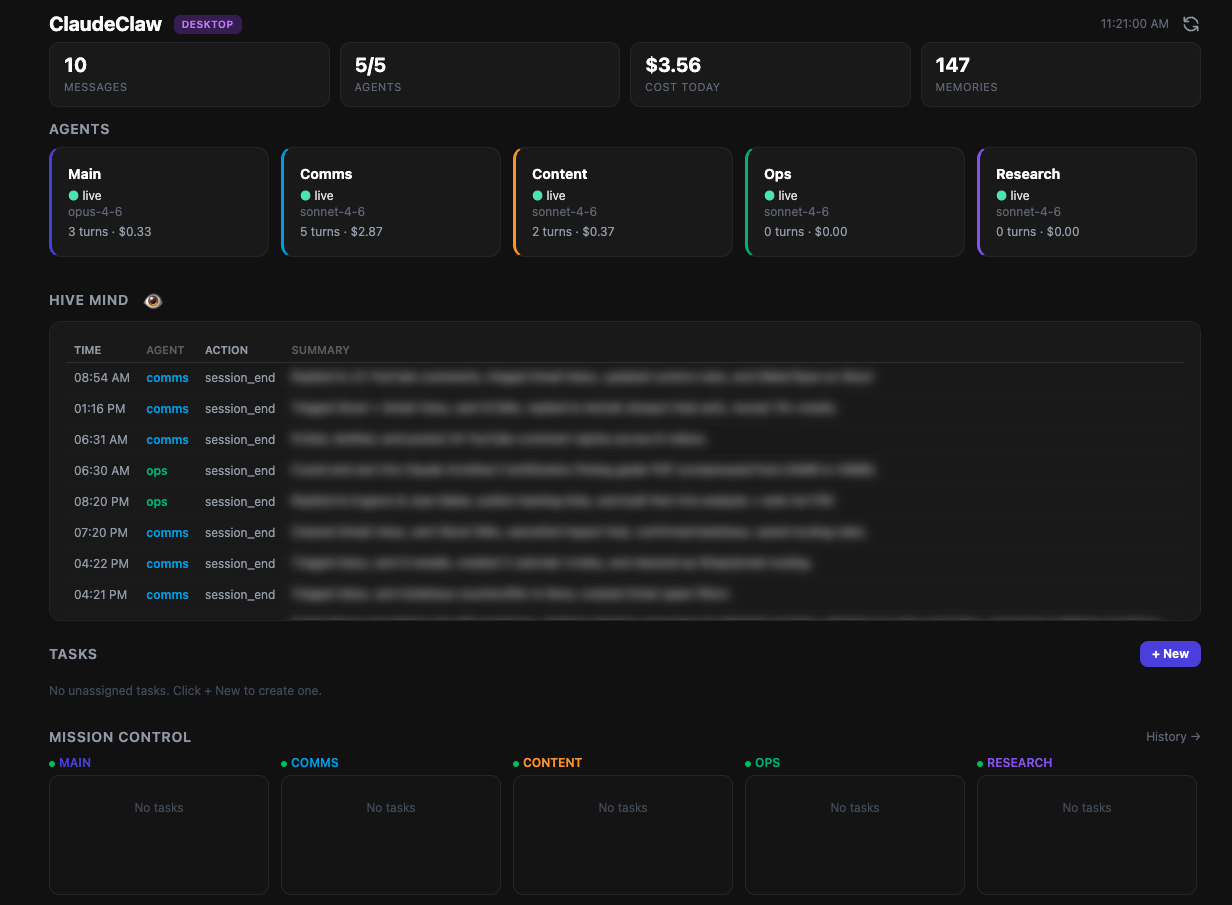
ClaudeClaw upstream our base
Your Claude Code CLI delivered to your phone via Telegram. Spawns the real claude binary, pipes results back.

MindStudio AI Command Center
Kanban for managing business goals across multiple parallel Claude Code agent sessions.
/agent-context/ directory with global-state.md.
n8n
"AI agents and workflows you can see and control" — visual node canvas where every step shows its structured I/O.
Open Interpreter (01 App)
Open-source voice interface that controls your real computer — opens Chrome, edits Calendar, runs apps.
Mem.ai (Mem 2.0)
Self-organizing AI second brain — drop notes in, auto-tags + auto-links + chat across your knowledge graph.
Agent / LLM observability platforms
Langfuse
Open-source LLM engineering platform for debugging, tracing, and evaluating agent applications.
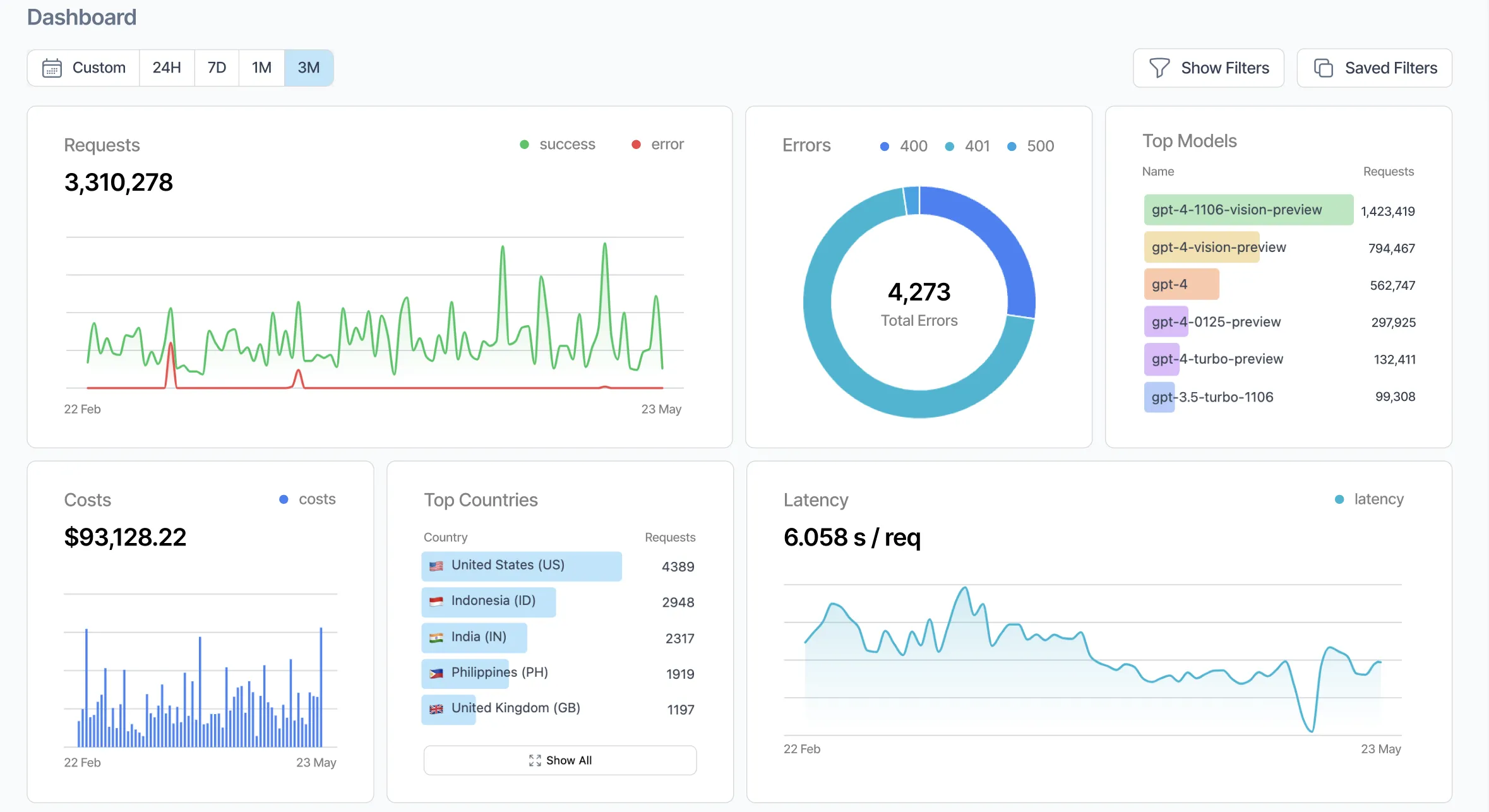
Helicone
Gateway-style LLM observability — proxy provider calls, get request-level routing, caching, analytics.
key:value filters.LangSmith
LangChain's first-party tracing, eval, and prompt-hub.
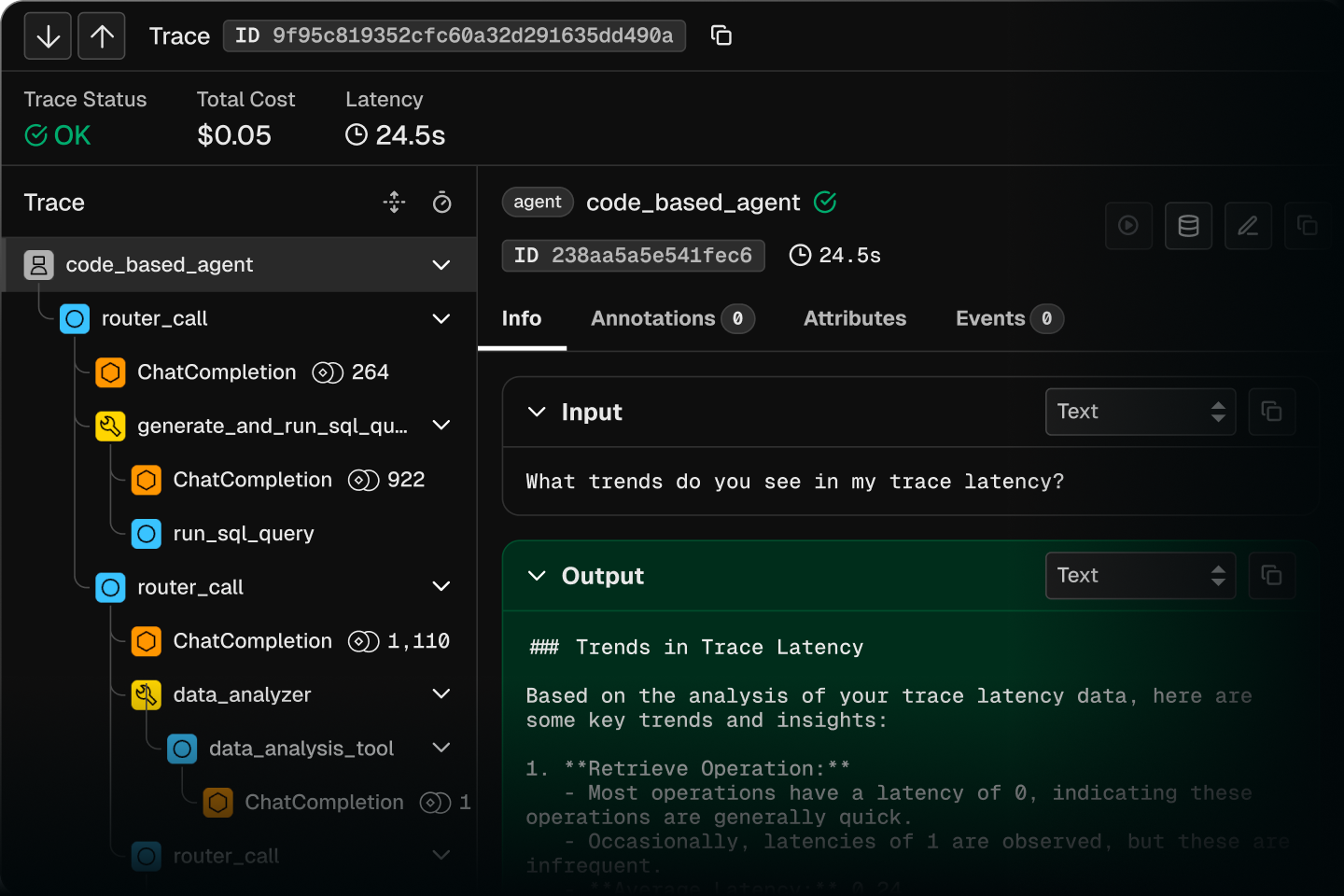
Arize Phoenix
Open-source, OpenTelemetry-native agent observability. pip install → localhost:6006.
Braintrust
Eval-first observability — production traces convert to eval datasets in one click.
regressions.jsonl. Replay on every model change.Coding agents + multi-agent orchestrators
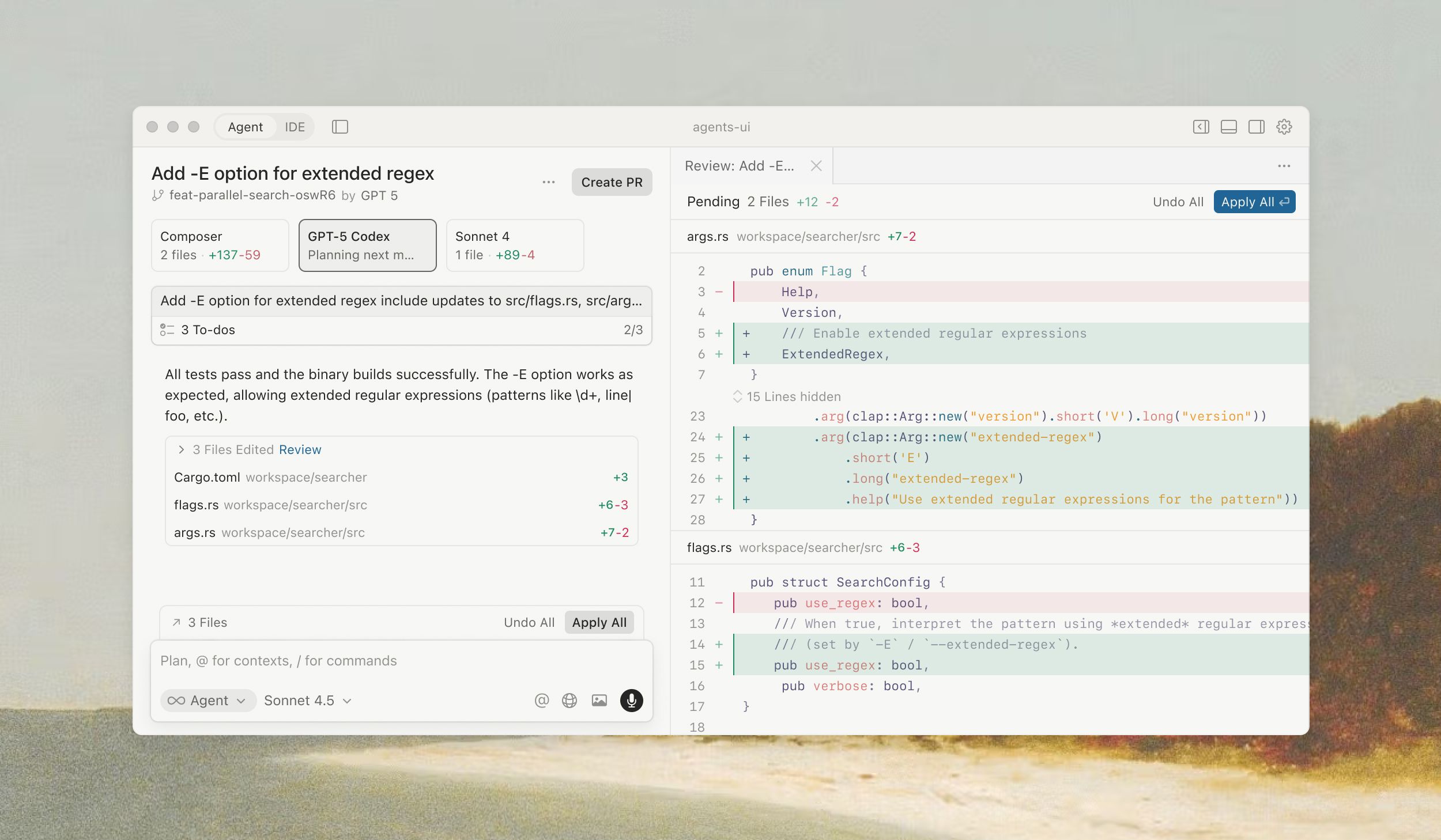
Cursor 2.0 / 3.0 — Agents Window
AI-native IDE that pivots from file-centric to agent-centric.
Devin 2.0 (Cognition)
Cloud-hosted autonomous software engineer — its own IDE, shell, browser, planner.
Replit Agent 4
Describe an app in plain English; Agent 4 generates frontend, backend, DB — and tests itself.
CrewAI Studio
Visual drag-and-drop builder for role-based AI crews.
Microsoft AutoGen Studio
Low-code WYSIWYG builder for multi-agent teams with live message streaming.
Part 10Improvement roadmap
Each row is a concrete change to our setup with effort/impact. Sorted: quick wins first. Each top-5 item has a copy-ready implementation prompt below.
| # | Improvement | Inspired by | Effort | Why it matters | Priority |
|---|---|---|---|---|---|
| 1 | Per-mission cost stamp on every card | Helicone, LangSmith | 1 h | Today $9 disappeared in an hour. Inline cost makes runaway visible. | Now · this week |
| 2 | Freeform query bar above Mission Control | Helicone HQL | 3 h | Mouse-facets break at 100+ missions. | Now · this week |
| 3 | Fire-and-forget capture verb — voice/text → memory | Mem.ai, Open Interpreter | 2 h | Every Telegram message gets routed through Claude. Sometimes you just want to capture. | Now · this week |
| 4 | Today's-learnings tile on the System page | Mem.ai, Langfuse Sessions | 3 h | Memory consolidation is invisible. | Now · this week |
| 5 | Per-skill cost breakdown on Usage | Langfuse | 2 h | Know cost total but not which skill is expensive. | Now · this week |
| 6 | Session primitive — bundle tool calls + sub-agent under one ID | Langfuse, Phoenix | 4 h | Audit shows flat events. Session view: "this question cost $2.30 across 14 calls." | Soon |
| 7 | Verification lane on Kanban — auto-spawn verifier | Replit Agent 4 | 5 h | Catches "bot said done but did the wrong thing". | Soon |
| 8 | Editable plan as artifact | Devin Interactive Planner | 4 h | Plan never collapses into chat history. | Soon |
| 9 | Flag-for-review queue with 3-field rubric | LangSmith, Braintrust | 4 h | Turns memory consolidation into signal, not noise. | Soon |
| 10 | Outcome-card framing for Mission Control | MindStudio | 2 h | "Ship spotlight batch" > "process 100 product images". | Soon |
| 11 | Per-agent skill-allowlist as a hard SDK gate | — | 6 h | Scoping enforced by prose today. Hard gate needed for team-bots. | Soon |
| 12 | Tiled parallel work surface | Cursor 2.0 | 8 h | Valuable once we have 2+ agents. | Year-out |
Implementation prompts (top 5)
Implement roadmap item #1: per-mission cost stamp on every card.

Context: Mission cards in /Users/Kawader/ClaudeClaw/claudeclaw-os/web/src/pages/MissionControl.tsx currently show title + assignee + status. They do NOT show cost or tokens.

Steps:
1. Read claudeclaw-os/src/db.ts. If input_tokens / output_tokens / cost_usd are not on mission_tasks, add them via a new migration (follow the existing migration pattern).
2. Update the spawn pipeline in claudeclaw-os/src/scheduler.ts (function runDueMissionTasks) to persist token counts + cost back after the spawn. The Anthropic SDK returns usage in the response — capture it.
3. Update web/src/pages/MissionControl.tsx — add an inline cost badge to each card. Row below title: "$0.42 · 1.2k tokens" in muted color. Skip the row if null.
4. Verify by triggering a mission, waiting for completion, refreshing — the card should show the cost inline.

Don't change anything else. Keep minimal.

Done when:
- Migration runs cleanly
- A completed mission shows cost inline
- A queued mission shows no cost row

Pause and confirm before any write outside claudeclaw-os/ + claudeclaw-os/store/.
Implement roadmap item #2: freeform query bar above Mission Control that parses key:value filters.

Spec:
- Single text input atop /Users/Kawader/ClaudeClaw/claudeclaw-os/web/src/pages/MissionControl.tsx
- Accepts: status:queued, status:running, status:done, status:failed, agent:<name>, since:24h, since:7d, since:2026-05-01, free text
- Combined: "status:queued agent:main since:24h grant"
- Parser: 30-line pure function in web/src/lib/queryParse.ts. No external deps.
- Filter visible cards client-side. Show parsed-filter chips below with "x" to remove.
- Persist last query in sessionStorage.

Steps:
1. Write the parser as a pure function. Unit-test in __tests__.
2. Wire to the existing list filter in MissionControl.tsx.
3. Style: small monospace pill chips for active filters.

Done when:
- "status:queued" filters to queued only
- "agent:main since:7d budget" combines correctly
- Filter chips visible + removable
- 5+ unit tests pass

Don't refactor existing kanban code.
Implement roadmap item #3: /capture Telegram verb that appends to memory with zero LLM routing.

Spec:
- Command handler in /Users/Kawader/ClaudeClaw/claudeclaw-os/src/bot.ts.
- Triggers: "/capture <text>" | forwarded message with /capture caption | voice memo with /capture caption.
- Behavior:
  - Text → append to new raw_captures table. Echo "✓ captured".
  - Voice → transcribe via existing pipeline, save transcript + audio id. Echo "✓ captured (transcribed)".
- NEVER spawn Claude. Zero LLM cost per /capture.
- Nightly job (call from scheduler.ts at cron 0 3 * * *) takes raw_captures from last 24h, runs through the existing memory consolidator (Gemini Flash). Now searchable.

Steps:
1. Migration: CREATE TABLE raw_captures (id, chat_id, kind, text, audio_id, created_at).
2. Add bot.command('capture', ...) handler.
3. Wire nightly consolidator in scheduler.ts.
4. Test: send "/capture remember to call Naeem about meta ads" → row exists → next morning, memory appears.

Done when: /capture works for text + voice, raw_captures gets rows, memory shows up after nightly run.

Pause and confirm before any write outside claudeclaw-os/ + ~/.claude/projects/.../memory/.
Implement roadmap item #4: "Today's learnings" tile on the System page.

Spec:
- Location: System page, after the stat-tile row, before Controls.
- Data: GET /api/system/learnings returns last 24h of memory entries from ~/.claude/projects/-Users-Kawader-KAWASIST/memory/ (mtime >= now-24h). For each: title, type, 1-line summary.
- Display: card "Today's learnings (N)" + max-3-row list. "View all" expands to a dialog.

Steps:
1. Backend: GET /api/system/learnings in /Users/Kawader/ClaudeClaw/claudeclaw-os/src/dashboard.ts. Read memory dir, filter by mtime, parse frontmatter.
2. Frontend: extend web/src/pages/System.tsx with <LearningsTile />. Hit endpoint on mount.
3. Empty state: "No new learnings in the last 24h — the consolidator runs every 30 min."

Done when: endpoint returns valid JSON, tile shows entries OR empty state, "View all" opens a dialog.

Don't change any other tiles.
Implement roadmap item #5: per-skill cost breakdown on the Usage page.

Spec:
- Group today's token spend by skill (slash command) invoked.
- Display: bar chart / sorted list under Today Tokens tile in web/src/pages/Usage.tsx.
- "Unattributed" bucket for free-form chat.

Steps:
1. Tag each spawn with skill_slug. In src/skills.ts (or wherever /api/kawader/skills/:slug/run lives), record skill_slug.
2. Migration: ALTER TABLE conversation_log ADD COLUMN skill_slug TEXT.
3. New endpoint: GET /api/usage/by-skill?since=24h → [{skill: '/home', tokens: 4200, cost: 0.35, turns: 1}, ...].
4. Frontend: horizontal bar chart with inline SVG (no library).

Done when:
- Chart shows at least 2 buckets if skills fired
- Free-form chat in "Unattributed"
- Sums match Today Tokens / Cost

Don't change existing tiles. Add only.
Part 11Case study: Kawader as a personal AI OS
Who
Kawader Art Productions — Ramallah-based AV rental house (~617 rentable items, 374 published) and production company (IBNS S1 wrapped 2025, S2 grant in flight). One founder/DOP, one engineer, working across rental ops, film production, content/social, community programs, and digital infrastructure.
What we replaced
- Manually-maintained
STATUS.mdupdated once a session — now a continuously-consolidated memory store + dashboard. - 14 SaaS tabs (Notion, Odoo, Drive, Gmail, Cloudflare, master sheet, internal Pages, calendars, WA Web, Telegram desktop) — single Quick Tools launcher + skill registry.
- "Where did I put that draft?" — Files browser + Memory consolidation pulling outputs/ into searchable storage.
- Cron jobs scattered across launchd plists — one Scheduled page.
- Forgetting morning briefs — auto-firing
/homeat 7am.
The build journey
Four sessions, ~20 hours total, captured commit-by-commit on the kawader-customizations branch:
- Session 1 — Install + integrate. Clone upstream, run setup wizard, register bot, seed SQLite from KAWASIST sources.
- Session 2 — Verify + harden. Audit the install, branch onto
kawader-customizations, snapshot SQLite, write the runbook. 8 commits. - Session 3 — Make usable. Fix empty Mission Control board, build Skills + Quick Tools + System pages, fix the autonomous-mission-worker incident, wire dead kill switches. ~14 commits.
- Session 4 — Field guide. This document: pixel-correct annotations + Excalidraw diagrams + multi-agent + Karpathy method + 31 copy-ready prompts.
A day in the life
- 06:55 · launchd-scheduled
/homefires. Brief appears in Telegram before the alarm. - 09:30 · arrive at office, open dashboard. Mission Control shows overnight work + Inbox context.
- 11:00 · client WhatsApp about a rental quote. From phone, voice-note "@kawader summarize the GearLine quote we sent on 2026-04-19 and draft a counter at $1,800". Reply in ~25 s.
- 14:00 · IBNS post-production. Skills page → Run
/site-iter. Result streams in /chat while you work. - 17:30 · queue an overnight mission: "audit Notion overdue >7d and draft a triage plan".
- 22:00 · check Audit to confirm nothing unexpected fired. Pause the mission worker before sleep.
What hit us in the face
assigned_agent='main'. The scheduler claimed each row every 60 s and ran Claude against it — but the "prompts" were STATUS.md focus lines. Caught it via the System page Activity feed. Fixes: re-seed with assigned_agent=NULL + wire the previously-dead MISSION_WORKER_ENABLED kill switch./checkin in chat returns "Unknown skill" because the Agent SDK doesn't expand them. Fix: custom /api/kawader/skills/:slug/run endpoint that reads the command file body and feeds it as a real user message.localhost:3141/system without ?token=… and the SPA loads but every API call 401s. Fix today: bookmark the full URL.The numbers (live, May 2026)
The $9 bakes in the autonomous-worker incident — under normal use expect $0.30-0.80 per /home turn, $0.10-0.30 per chat. A scheduled daily brief + ~10 hand-fired turns/day puts you at $40-80/mo on Sonnet.
What we'd do differently
- Don't seed live tasks. Seed display-only state.
- Build the System page on Day 1. The autonomous-worker incident would have taken hours to debug without it.
- Verify every kill-switch end-to-end.
SCHEDULER_ENABLEDexisted but the scheduler never read it. - Branch first, commit small.
kawader-customizationsis the only thing between us and a painful upstream merge. - Document gotchas as you find them. The slash-command + token-in-URL paper cuts would otherwise be forgotten.
What's next
Top 3 from the roadmap above:
- Per-mission cost stamp — surface inline so the next runaway burn is obvious in 30 s.
- Telegram fire-and-forget capture — cut the friction for quick thoughts.
- Today's-learnings tile — make memory consolidation visible.
Part 12Prompt library
All copy-ready prompts in one place. Press / any time to search. Each one is self-contained — paste into a fresh session and it works without back-context. Most include a "Done when:" checklist.
Daily-ops + workflow prompts
Scan my WhatsApp Business channel for unanswered rental inquiries.

Definition of "unanswered inquiry":
- Inbound message from a non-team contact (not Ameer, not staff)
- Mentions rental keywords (rent, rental, camera, lens, gear, kit, package, weekend, day, project, shoot, film, video)
- Last message in the thread is from THEM, not us
- Older than 2 hours

For each:
1. Contact name + phone (last 4 digits only in chat reply)
2. Inquiry summary (≤30 words)
3. Draft reply in Palestinian dialect, ≤40 words, sign off "Kawader"
4. Notes for me if missing info

Post the list to me in Telegram. Do NOT send any WA message — drafts only.

Done when: Telegram message with all unanswered inquiries listed, drafts shown, no WA sends.
Produce my end-of-day wrap and append it to /Users/Kawader/KAWASIST/notes/daily/{TODAY}.md.

Pull from:
1. Today's git commits in /Users/Kawader/KAWASIST and /Users/Kawader/ClaudeClaw/claudeclaw-os (git log --since=today --oneline)
2. Completed mission tasks today
3. Today's bot turns (Usage / tokens.json)
4. Today's auto-consolidated memories
5. Any unresolved threads from notes/daily/{YESTERDAY}.md "What's next"

Format:
## EOD wrap — {TODAY}

**Shipped:**
- ...

**Learned (from auto-memory):**
- ...

**Open / blocked:**
- ...

**Tomorrow's first thing:**
- ONE line. The single most important start.

Append (don't overwrite) to notes/daily/{TODAY}.md.

Done when: file has the 4-section wrap appended.
Research grant <GRANT_NAME> for the IBNS S2 production. Overnight task.

For the grant:
1. Find the official call page. Capture: opens-date, deadline, eligibility, max amount, currency, what they fund, required deliverables.
2. Find 3 previous grantees in our genre. Project, year, amount, what won them the grant.
3. Compare to IBNS S2's profile (pitch-deck status, budget alignment, timeline).
4. Fit assessment: 1-5 with one-paragraph reason.
5. If fit ≥3, draft the FIRST PARAGRAPH of an application (3-5 sentences, MSA Arabic, hook-first).

Write full briefing to outputs/grant-research/<GRANT_NAME>-{TODAY}.md.
Post 5-line summary to Telegram with fit score, deadline, hook.

Done when: brief exists + Telegram summary sent.
Onboarding + verification prompts
I'm a new operator joining Kawader and need to understand the AI OS setup. Read in order:

1. /Users/Kawader/KAWASIST/outputs/claudeclaw-guide/index.html — this guide
2. /Users/Kawader/KAWASIST/CLAUDE.md
3. /Users/Kawader/KAWASIST/knowledge/business-brain.md
4. /Users/Kawader/KAWASIST/outputs/claudeclaw-guide/team-templates/README.md
5. /Users/Kawader/KAWASIST/skills/INDEX.md

Then write me a 300-word onboarding doc to outputs/onboarding/{TODAY}.md covering:
- What KAWASIST is in 2 sentences
- The 4 ways to invoke the bot (Chat / Mission / Scheduled / Skills)
- The 4 layers (Knowledge / Memory / Skills / Tools) — where do they live
- Which agent role I would inhabit — pick based on what you know; ask me if unclear
- 3 specific commands I should try first
- 1 safety rule I must not violate

End with one question about my role I haven't answered.

Done when: outputs/onboarding/{TODAY}.md exists, <400 words, has all 6 sections.
Verify the per-mission cost stamp from roadmap #1 is wired correctly.

Steps:
1. Read latest 5 completed mission_tasks: sqlite3 store/claudeclaw.db "SELECT id, status, input_tokens, output_tokens, cost_usd FROM mission_tasks WHERE status='done' ORDER BY completed_at DESC LIMIT 5;"
2. Check input_tokens + output_tokens are non-null and cost_usd is positive.
3. Cross-check sum against /api/tokens within 10%.
4. Open Mission Control → confirm those 5 cards show cost inline.

If any check fails, report exactly which one.

Don't fix anything — verify only.

Done when: all 4 conditions checked with evidence.
Verify the new <AGENT_NAME> agent obeys its scope.

Steps:
1. Send a probe for a skill NOT on its allowlist. Expected: refusal citing scope.
2. Send a write-intended out-of-scope request. Expected: refusal.
3. Send a legitimate in-scope request. Expected: it runs.
4. Audit → filter by agent_id = <AGENT_NAME>. Confirm 3 entries with correct status (BLOCKED, BLOCKED, OK).
5. Hive Mind → filter for <AGENT_NAME>. Confirm in-scope action logged.

Report pass/fail. If failure: which check + the exact response that broke scope.

Don't modify config — verify only. If a fix is needed, propose the CLAUDE.md edit and stop.

Done when: 5/5 pass OR you've identified the failing check.
SourcesEverything cited above
Anthropic + Claude
ClaudeClaw + multi-agent setup
Personal AI + Karpathy / Excalidraw
- Andrej Karpathy — homepage
- nanoGPT — Karpathy's from-scratch GPT
- micrograd — Karpathy's tiny autograd engine
- Excalidraw — hand-drawn diagram tool
- Obsidian Excalidraw plugin
Industry references (Part 9)
- Langfuse · Helicone · LangSmith · Arize Phoenix · Braintrust
- Cursor 2.0 · Devin 2.0 · Replit Agent 4 · CrewAI · AutoGen Studio
- MindStudio Command Center · n8n · Open Interpreter · Mem.ai